







To verify security patch remediation properly, do not stop at a deployment console that says “successful.” A successful patch job can prove that an update action ran, but it may not prove that the fixed code is active, every affected asset received it, a required restart happened or the vulnerable condition is actually gone.
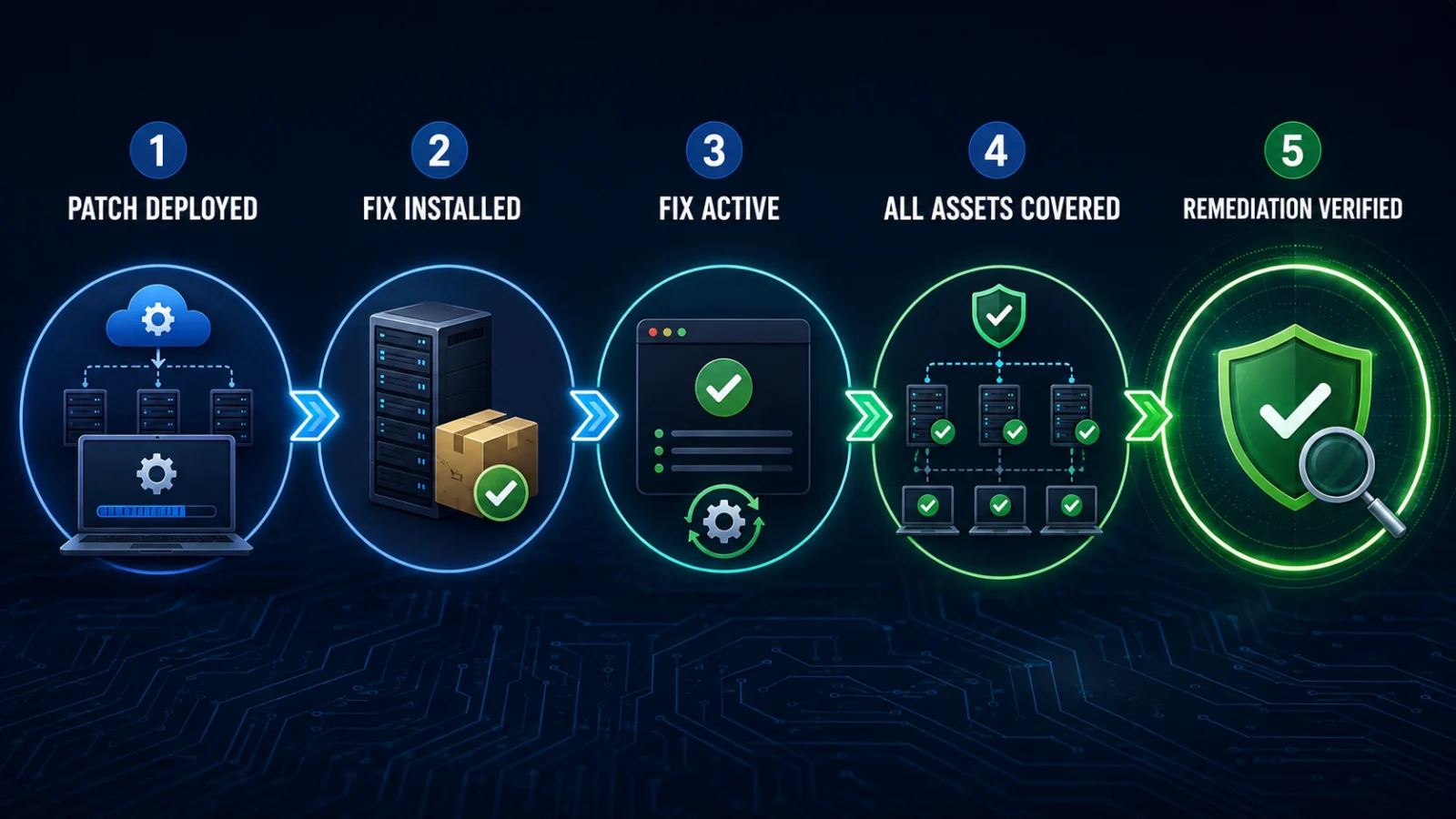
The strongest approach is to move through an evidence chain: deployed → installed → active → covered everywhere → independently verified.
Direct answer
What proves a security vulnerability is really fixed?
Start with the vendor advisory and determine the exact fixed package, build, configuration or mitigation. Confirm that state on the affected asset, verify the fixed code is actually running, check every relevant node or instance and then use an appropriate second verification method such as authenticated rescanning or vulnerability-specific safe retesting.
What “patch successful” does not prove
A patching tool reports an action — not necessarily the final security state
It may not prove that all replicas were patched, a service restarted, a stale workload was replaced, scanner coverage exists or another untracked instance is still vulnerable.
State 1
Deployed
The patching platform says the update was sent or executed.
State 2
Installed
The target reports the fixed package, build or configuration is present.
State 3
Active
The running service, process or workload is actually using the remediated code.
State 4
Verified
The vulnerable condition is no longer present across the relevant scope and independent evidence supports closure.
In this guide
- The remediation proof chain
- Start with the vendor’s fixed state
- Installed vs actually running
- Restarts and reloads
- Verify every affected asset
- Containers, VMs and deployment images
- Scanner still red after patching
- Scanner green after patching
- The version-number and backport trap
- Use a second verification method
- When retesting is justified
- Patch verification vs compromise assessment
- Watch, verify or escalate
- Worked example
- Verification boundaries
- Limitations
- FAQs
How to verify security patch remediation from deployment to proof
The UK National Cyber Security Centre recommends a verification process to make sure that after a vulnerability has been addressed through an update, reconfiguration or mitigation, the vulnerability is actually no longer present. CISA has similarly advised rescanning patched or mitigated assets and, where possible, using more than one verification method.
Remediation proof chain
Core rule: the stronger the vulnerability and exposure, the more important it is to verify the outcome rather than relying on the patch-management job status alone.
Start with the vendor’s exact definition of “fixed”
Do not begin with a generic rule such as “version must be greater than X.” Start with the security advisory from the product or operating-system vendor.
Identify exactly what the vendor says resolves the vulnerability:
- a specific software release;
- a package revision;
- a firmware build;
- a configuration change;
- a disabled feature;
- a hotfix or backported patch;
- or a temporary mitigation that remains subject to later replacement.
Strong starting evidence
The vendor identifies the affected versions and the precise corrected or mitigated state.
Weak starting evidence
A generic scanner or blog says “upgrade to version X” without accounting for vendor packaging, backports or product-specific conditions.
Installed does not always mean the fixed code is running
A package manager, endpoint-management tool or patch platform may show an update as installed while the vulnerable process is still running an older in-memory version.
| Evidence | What it can establish | What can still be unresolved |
|---|---|---|
| Patch job successful | The deployment task completed according to the tool | Installation, activation and fleet coverage may still need verification |
| Fixed package/build present | The corrected software exists on disk or in package inventory | An older process or workload may still be active |
| Running version confirmed | The active service is using the expected fixed code | Other nodes or replicas may remain vulnerable |
| Scanner clear | The scanner did not detect the vulnerability in its tested scope | Detection, coverage and scanner accuracy still matter |
| Independent retest | The vulnerable condition could not be reproduced by the approved verification method | The result applies only to the tested scope and conditions |
Check whether the patch required a restart, reload or workload replacement
Some updates become effective immediately. Others require a service restart, application restart, device reboot, container recreation or equivalent lifecycle action before the fixed code becomes active.
Do not invent a restart requirement. Follow the vendor’s instructions for the affected product. “Always reboot after patching” is not a universal security rule.
A useful verification sequence is:
Verify every affected node, replica and forgotten asset
One of the easiest ways to declare a vulnerability fixed too early is to verify only one machine.
Check the actual scope that can contain the affected product or component:
- load-balanced application nodes;
- active and standby appliances;
- database or middleware clusters;
- Kubernetes pods and replicas;
- virtual machines and autoscaling groups;
- developer, test and staging environments;
- contractor-managed or subsidiary systems;
- shadow IT and forgotten internet-facing assets.
NCSC’s current vulnerability-management guidance specifically warns that organisations have experienced incidents on systems their security and IT teams did not know existed. For serious vulnerabilities, checking only the normal inventory can therefore create a false sense of closure.
Coverage failure
Three nodes are fixed but a fourth member of the cluster remains vulnerable.
Inventory failure
The known fleet is patched but an unmanaged test or contractor system still exposes the product.
Lifecycle failure
Today’s host is fixed but tomorrow’s autoscaled host is created from an old vulnerable image.
Do not forget container images, VM templates and other deployment sources
Modern infrastructure can recreate vulnerable software even after the currently running host has been patched.
Why runtime-only verification can fail
Where relevant, verify not only the running workload but also the source that can recreate it: container image, VM template, golden image, appliance image, deployment artifact or infrastructure pipeline.
TPS engineering interpretation: remediation should cover both the current runtime and any controlled deployment source capable of restoring the vulnerable state. The exact implementation depends on the platform.
Patch installed but the vulnerability scanner is still red
A scanner continuing to report a CVE after patching deserves investigation — but it does not automatically prove the patch failed.
1
Check vendor status
Does the vendor say the installed build or package contains the fix?
2
Check activation
Was a restart, reload or redeployment required before the fix became active?
3
Check scanner detection
Does the scanner actually support this exact CVE, product and package model?
4
Check scope
Could another node, package, file or endpoint still satisfy the scanner’s vulnerable condition?
5
Check backports
Is the scanner incorrectly judging the system only from an upstream version number?
6
Investigate false positive
If trusted evidence conflicts, investigate rather than deleting the finding without proof.
NCSC explicitly notes that vulnerability assessment software can produce false positives and recommends investigating suspected false positives before removing the issue.
A green scan is useful evidence — but check what was actually tested
The opposite mistake is assuming that one clean scan proves the entire environment is fixed.
Before treating a green result as closure, ask:
- Does the scanner have a detection for this vulnerability?
- Was the relevant host or application actually scanned?
- Was authenticated access required for accurate detection?
- Were all nodes, interfaces and environments covered?
- Could the scanner produce false negatives?
- Could an untracked or shadow asset remain?
NCSC warns that new vulnerability detections can take time to appear in scanning tools and specifically advises defenders to check whether a scanner has implemented detection for a particular newly important vulnerability.
No finding is not the same as no vulnerability when the scanner did not have the right detection or did not cover the affected asset.
The backported-fix and version-number trap
Version strings are especially dangerous when a vendor backports security fixes into an older software branch.
Red Hat’s security guidance explains that simply looking at the upstream version number may not tell you whether a package is vulnerable because security fixes can be backported while the visible upstream version remains older. It also warns that scanners relying only on version comparisons can create false positives.
Bad assumption
“Upstream says fixed in 5.2, my system says 5.1, therefore it must still be vulnerable.”
Better verification
Check the vendor’s security advisory, package revision, errata or supported vulnerability-status data for the specific distribution and product.
Use a second verification method when the risk justifies it
CISA’s Log4Shell response guidance provides a useful general lesson: after mitigation, scan the patched or mitigated asset and use more than one method where possible to verify that mitigation succeeded.
The second method does not always need to be penetration testing. Depending on the vulnerability, it might be:
- authenticated vulnerability scanning;
- vendor-provided verification command or script;
- package and running-version comparison;
- configuration-state inspection;
- safe application-level validation;
- software-composition or SBOM verification;
- controlled security retesting by qualified staff.
Do not download arbitrary public exploit code and fire it at production merely to prove the patch worked. NCSC warns that released exploit code should not be used to confirm vulnerability without expert assessment because supposedly useful exploit code can itself be unsafe or malicious.
When stronger controlled retesting is justified
The appropriate proof standard depends on the vulnerability and the system.
| Situation | Reasonable verification depth |
|---|---|
| Routine missing security package with reliable authenticated detection | Vendor fixed-state confirmation plus authenticated rescan may be sufficient |
| Critical internet-facing vulnerability with active exploitation | Stronger vulnerability-specific verification and separate compromise assessment may be justified |
| Complex configuration mitigation | Verify the resulting security behaviour, not merely that the configuration command ran |
| Custom application vulnerability | Functional security retest may be more meaningful than package inventory |
| Scanner and vendor status disagree | Investigate using another evidence source before closing or reopening the finding |
Patch verification and compromise assessment answer different questions
This guide asks whether the vulnerability is fixed now. It does not answer whether attackers exploited the system before the remediation.
Remediation verification
Is the vulnerable condition still present or exploitable now?
Compromise assessment
Did an attacker exploit the vulnerability during the earlier exposure window and establish access or persistence?
If the vulnerability was actively exploited or appeared in CISA’s Known Exploited Vulnerabilities Catalog, see ThePulseSignal’s CISA KEV guide on checking local exposure and compromise.
For software supply-chain incidents where the problem is whether a malicious dependency entered your environment, see ThePulseSignal’s malicious npm package verification guide.
Watch, verify or escalate
1
WATCH
The vendor-defined fixed state is present, active and consistently verified across the relevant scope, with no conflicting evidence.
2
VERIFY
The patch job succeeded but activation, scanner coverage, another node, backport status or deployment-source state is still uncertain.
3
ESCALATE
A critical or exposed system remains vulnerable, verification methods disagree materially or the vulnerability requires specialist retesting or incident response.
Worked example: four servers, one incomplete remediation
Assume a web service runs behind a load balancer on four application nodes.
| Evidence | Conclusion |
|---|---|
| Patch console shows 4/4 jobs successful | Deployment activity completed, but final remediation is not yet proven. |
| Nodes A, B and D report the corrected package | Three nodes have strong installation evidence. |
| Node C still reports the affected package | The environment remains partially vulnerable despite the green deployment dashboard. |
| Node C is patched and required service restart completes | The corrected build can now become active. |
| Authenticated rescan covers A–D and clears the finding | Evidence is materially stronger that the known four-node scope is remediated. |
| Asset discovery finds an old internet-facing test node E | Remediation was not complete across the actual exposure surface. |
The important lesson is that patch-management success and vulnerability-management closure are different states.
Verification notes: what is established and what is not
Confirmed guidance
- NCSC recommends verifying that a fixed or mitigated vulnerability is no longer present.
- CISA has advised rescanning mitigated assets and using more than one verification method where possible.
- NCSC warns vulnerability scanners can produce false positives and false negatives.
- NCSC warns scanner detection for new vulnerabilities can lag.
Vendor-specific evidence
- Red Hat documents how backported fixes can confuse version-only scanners.
- Vendor advisories remain the authoritative starting point for the exact fixed package or build.
TPS engineering interpretation
- Installed, active and verified should be treated as distinct evidence states.
- Fleet-level closure requires checking every relevant node or workload.
- Deployment sources capable of recreating vulnerable workloads should be included where applicable.
Not established by one green signal
- that every asset is patched;
- that scanner coverage is complete;
- that a required restart occurred;
- that no shadow system remains;
- that attackers did not exploit the system earlier.
Verification method
ThePulseSignal reviewed the UK NCSC vulnerability-management verification, active-exploitation, asset-identification, assessment and scanning guidance; CISA’s Log4Shell remediation-verification guidance; and Red Hat’s security-backporting guidance. The article separates patch deployment, installation, activation, fleet coverage, scanner evidence and vulnerability-specific verification rather than treating any single tool status as conclusive proof.
Limitations and important boundaries
There is no universal verification command that proves every vulnerability fixed. The appropriate method depends on the product, vulnerability, vendor advisory, architecture and exposure.
- A green patch-management status does not prove that every affected asset is remediated.
- A red vulnerability scan does not automatically prove patch failure.
- A green vulnerability scan can miss issues because of detection, authentication, scope or scanner limitations.
- Version-number comparisons can be unreliable where vendors backport security fixes.
- Some fixes require service restart, process restart, workload recreation or reboot; others do not.
- Containers, VM images, templates or deployment artifacts may recreate a vulnerable state if they are not updated.
- Do not run untrusted exploit code against production simply to test remediation.
- Verification of current remediation does not establish whether historical compromise occurred.
- High-risk vulnerabilities may require vulnerability-specific vendor guidance or qualified security testing.
Security patch verification: frequently asked questions
Does “patch installed successfully” mean the vulnerability is fixed?
Not always. It is evidence that the installation process completed, but you may still need to verify the fixed build is active, required restarts happened, every affected asset was covered and the vulnerable condition no longer exists.
How do I verify a security patch?
Start with the vendor’s corrected build or configuration, confirm it is installed and active, check the entire affected scope and use an appropriate second verification method such as authenticated scanning or vendor-supported retesting.
Why does my vulnerability scanner still show the CVE after patching?
Possible causes include incomplete remediation, a required restart, another vulnerable instance, scanner detection logic, stale information or a false positive. Backported fixes can also confuse scanners that rely only on upstream version numbers.
Can a vulnerability scanner show green even if I am still vulnerable?
Yes. False negatives, missing CVE detections, unauthenticated scans, incomplete asset coverage or an unknown system can all weaken a clean result.
Do I need to reboot after every security patch?
No. Follow the vendor’s update instructions. Some products require a reboot or service restart; others activate the fix without one.
Should I use exploit code to test whether the patch worked?
Do not run arbitrary public exploit code against production. Prefer vendor-supported checks, safe scanner detections or controlled expert retesting where the risk justifies it.
Can an old container image make the vulnerability return?
Yes, if a corrected runtime is later recreated from an image or artifact that still contains the vulnerable component. Where relevant, update and verify the deployment source as well as the running workload.
If the patch is verified, do I still need to check whether attackers got in before patching?
Potentially. Current remediation verification and historical compromise assessment are separate questions. Active exploitation, KEV status and the asset’s exposure window can justify a separate compromise check.
Bottom line
To verify security patch remediation, move beyond “deployment succeeded.” Confirm the vendor-defined fixed state, prove the corrected code is active, check every affected asset or workload and use independent evidence to show the vulnerable condition is gone.
Best proof chain: patch deployed → fixed state installed → fixed code active → all affected assets covered → scanner or vulnerability-specific verification → remediation confirmed.
Last verified: August 22, 2026. This guide reflects current UK NCSC vulnerability-management guidance reviewed in May 2026, CISA remediation-verification principles and vendor guidance on backported security fixes.