







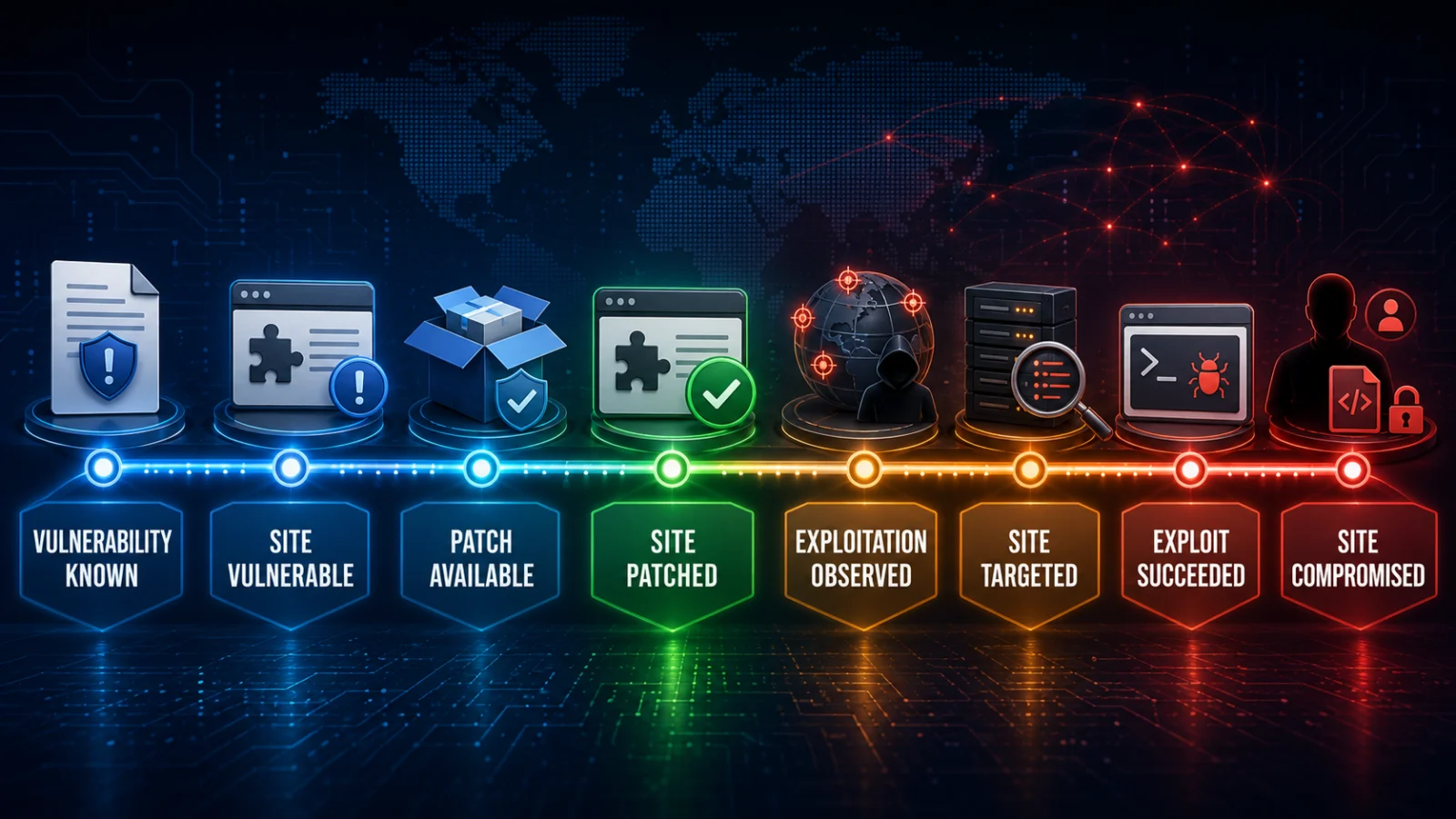
A WordPress plugin vulnerability does not automatically mean your website was hacked. You need to separate at least four questions: is your installed plugin actually vulnerable, has your site installed the fixed version, are attackers exploiting the flaw in the wild, and is there evidence that exploitation succeeded on your site?
Direct answer
What does a WordPress plugin vulnerability prove?
It proves that a defined plugin version or configuration contains a known weakness. It does not prove that your site’s installed version is affected, that an attacker targeted your site or that exploitation succeeded.
Critical distinction
Patched now does not mean never exploited
Installing the fixed version changes the site’s current vulnerability state. It does not erase the earlier period when the vulnerable version may have been reachable, so a site updated after exploitation began may still require incident investigation.
State 1
Vulnerable
Your installed version and required conditions fall inside the advisory’s affected scope.
State 2
Patched
Your site has actually installed a version the advisory identifies as fixed.
State 3
Compromised
Site-specific evidence shows successful unauthorized access, persistence or impact.
In this guide
- Start with the exact advisory
- Is this site actually vulnerable?
- What does patched mean?
- Actively exploited vs your site exploited
- Attack attempt vs successful exploit
- What proves compromise?
- Reconstruct the exposure window
- Investigate by vulnerability type
- Use checksums carefully
- What if no patch exists?
- Mitigated vs patched
- Inactive or removed plugins
- Vulnerability vs supply-chain compromise
- Incident-state workflow
- FAQs
A WordPress plugin vulnerability starts with the exact affected version and conditions
Do not stop at the plugin name or CVE headline. Read the advisory closely enough to identify:
- affected versions
- fixed version, if one exists
- required configuration
- required attacker privilege
- required user interaction, if any
- what successful exploitation actually allows.
A plugin can be vulnerable only under specific conditions. For example, Wordfence’s 2026 Breeze Cache research described an unauthenticated arbitrary-file-upload vulnerability affecting versions through 2.4.4, fixed in 2.4.5, while also documenting a configuration condition required for exploitation.
TPS rule: PLUGIN NAME MATCH ≠ SITE VULNERABLE. First match the installed version and any required exploit conditions.
How to determine whether your site is actually vulnerable
The first site-specific evidence should be the installed plugin version.
WP-CLI can display installed plugins, activation state and version information:
wp plugin listThen compare the installed version to the vulnerability advisory.
| Evidence | What it establishes | What it does not establish |
|---|---|---|
| Plugin installed | The component exists on the site | That the installed version is vulnerable |
| Affected version installed | The site’s code falls inside the advisory’s affected range | That required exploit conditions exist |
| Affected version + required conditions | The site is plausibly exploitable through the documented path | That any attacker attempted or succeeded |
| Fixed version installed | The site is outside the documented vulnerable version range for that flaw | That exploitation did not occur before the update |
“Patched” can mean three different things
When somebody says a plugin is patched, ask what exactly they mean.
Vendor patched
The developer produced a version intended to fix the vulnerability.
Patch available
The fixed package is available through WordPress.org, the vendor or another distribution channel.
Site patched
Your site’s installed files were actually updated to the fixed version.
Only the third state tells you the vulnerable version has been replaced on this WordPress installation.
FIXED IN VERSION X ≠ THIS SITE IS RUNNING VERSION X.
If you need to verify that the security fix actually reached and became active on the intended system, use the TPS guide Security Patch Installed: How to Verify the Vulnerability Is Really Fixed.
Actively exploited does not mean your WordPress site was compromised
Security researchers may report that a plugin vulnerability is being actively exploited in the wild. That normally means attack activity has been observed against the vulnerability across monitored systems.
Wordfence, for example, has published 2026 advisories describing large numbers of blocked exploit attempts against vulnerabilities in plugins including Breeze Cache and Kali Forms.
That raises the urgency for every affected site, but it does not establish that your site was successfully compromised.
Ecosystem evidence
Attackers are targeting and using the vulnerability somewhere.
Site evidence
Your logs, files, users, database or security telemetry show targeting or successful impact on this installation.
An exploit request is not the same as a successful exploit
A WAF or access log may show a request matching the exploit pattern. That proves something attempted to reach the vulnerable path.
It does not automatically prove success because:
- the request may have been blocked
- the site may already have been patched
- required configuration may not have existed
- the payload may have failed
- the request may have targeted the wrong endpoint
- successful execution may have produced no persistent change.
What evidence can establish that the site was compromised?
WordPress recommends identifying indicators of compromise rather than relying on the vague label “hacked.” For a plugin vulnerability, the evidence should match the capability the flaw gives an attacker.
Possible indicators include:
- unknown administrator accounts
- unexpected role or privilege changes
- malicious or unfamiliar plugins
- unknown PHP files or webshells
- modified plugin, theme or core files
- unexpected cron jobs or scheduled actions
- injected JavaScript or redirects
- unauthorized database changes
- unexpected modifications to
wp-config.phpor.htaccess - security telemetry showing successful payload execution.
PATCHED ≠ CLEAN. If an attacker created a backdoor before the vulnerable plugin was updated, replacing the plugin does not automatically remove that persistence.
Reconstruct the vulnerable site’s exposure window
If exploitation was observed in the wild before your site updated, build a timeline rather than assuming the current patch state answers the historical question.
- When did the site install the affected version?
- When was the fixed version released?
- When was public disclosure made?
- When was exploitation first observed?
- When did this site install the fixed version?
- Were exploit requests or suspicious site changes present during that interval?
The most important period is the overlap between site vulnerable and credible attacker activity.
A site can therefore be:
patched today and still require investigation because it was exposed yesterday.
Investigate according to what the vulnerability allowed
| Vulnerability class | What successful exploitation may enable | Evidence to prioritize |
|---|---|---|
| Authentication bypass / privilege escalation | Unauthorized account or administrator access | Users, roles, sessions, plugin/theme installation, configuration changes |
| Arbitrary file upload / RCE | Executable files, webshells or remote code execution | New PHP files, modified files, uploads, processes, outbound activity |
| SQL injection | Database disclosure or modification depending on flaw capability | Database/WAF telemetry, user data exposure, credential hashes, unexpected records |
| Stored XSS | Malicious script execution in affected users’ browsers | Injected scripts, altered posts/options, administrator interaction |
| Arbitrary file move/delete | Loss or relocation of security-sensitive files and possible follow-on exploitation | Missing files, moved files, configuration changes and subsequent site behavior |
Do not use CVSS alone to decide whether your site was compromised. Severity estimates how serious successful exploitation could be under the vulnerability’s defined conditions; it does not prove that your installation satisfied those conditions or that exploitation succeeded.
Use WordPress checksums as evidence, not as a universal clean bill of health
WP-CLI can verify WordPress.org-hosted plugin files against published checksums:
wp plugin verify-checksums --allWordPress core can also be checked:
wp core verify-checksumsA checksum mismatch can be valuable evidence of unexpected modification. But a clean result has boundaries.
It does not necessarily prove:
- the uploads directory contains no attacker-created PHP file
- the database contains no rogue administrator
- scheduled tasks are clean
- premium or custom plugins match a trusted vendor package
- credentials or session tokens were not stolen
- no attacker persistence exists outside the checked package files.
CHECKSUM CLEAN ≠ SITE FORENSICALLY CLEAN.
For premium, private or custom plugins, compare files against another trusted baseline such as the vendor release archive, deployment repository, known-good backup or source-control commit.
What if the WordPress plugin vulnerability has no patch yet?
“Update immediately” is not useful when no fixed version exists.
Depending on the advisory and operational impact, the safer choices can include:
- deactivate the plugin
- delete or replace it if the vulnerable code remains reachable
- disable the affected feature or endpoint
- apply an official vendor mitigation
- use a security-provider virtual patch or WAF rule
- restrict access to the vulnerable function
- monitor for exploit attempts and compromise indicators.
WordPress.org may temporarily close plugins with serious unresolved security issues. That closure is a signal to investigate, but it does not by itself prove your site was exploited.
Mitigated is not the same as patched
A WAF rule may block known exploit traffic while the vulnerable plugin version remains installed.
That produces another important state:
Mitigated
A control reduces the vulnerability’s reachable attack path, but the vulnerable code may still exist.
Patched
The vulnerable code has been replaced or corrected by the fixed software version.
WAF PROTECTED ≠ PLUGIN PATCHED. Virtual patching can reduce immediate exploitability, but the software should still be remediated when an appropriate fix is available.
Does deactivating the vulnerable plugin make the issue disappear?
Not necessarily.
WordPress distinguishes between deactivating and deleting a plugin. Deactivation prevents normal activation behavior, but the plugin files remain installed until removed.
Whether an inactive plugin’s vulnerable code is still reachable depends on the specific vulnerability. Some flaws require WordPress hooks that stop running after deactivation; others may involve directly reachable files or may already have created persistence before deactivation.
Follow the vulnerability-specific advisory rather than applying one universal rule.
A vulnerable plugin and a compromised plugin distribution are different incidents
A normal software vulnerability is an unintended weakness in legitimate code.
A supply-chain compromise can involve intentionally malicious code introduced into a legitimate plugin release, update channel or external dependency. Patchstack documented multiple 2026 WordPress supply-chain incidents involving malicious plugin releases and tampered external scripts.
In that scenario, asking only whether the version was “vulnerable” can miss the problem completely. The question becomes:
Did this installation receive a known-malicious build or dependency?
VULNERABLE CODE ≠ MALICIOUS DISTRIBUTION. Both can lead to compromise, but they require different evidence and timelines.
Use this WordPress vulnerability incident-state workflow
1
VULNERABLE ONLY
Installed version and conditions are affected, but there is no site-specific evidence of exploitation. Patch or mitigate urgently according to severity and exploitation status.
2
PATCHED + INVESTIGATE
The site is now fixed, but exploitation was observed before the update or suspicious requests occurred during the exposure window. Preserve evidence and inspect for impact.
3
COMPROMISED
Unauthorized users, files, database changes, persistence or other vulnerability-specific indicators are present. Treat this as incident response, not merely plugin maintenance.
Evidence boundary
A vulnerability advisory establishes affected software and exploit capability. A fixed version establishes the vendor’s remediation point. Threat-intelligence reports can establish exploitation in the wild. None of those alone proves that a particular WordPress site was compromised. Site-specific compromise requires evidence from logs, files, users, database state, security telemetry or other indicators consistent with successful exploitation.
WordPress plugin vulnerability: frequently asked questions
If I updated the vulnerable plugin, is the incident finished?
Not automatically. The update can close the vulnerability going forward, but if the site remained vulnerable while exploitation was occurring, investigate the historical exposure window and compromise indicators.
Does active exploitation mean my site was hacked?
No. It means attackers are using the vulnerability against sites in the wild. You still need site-specific evidence to establish targeting or successful exploitation of your installation.
If Wordfence blocked an exploit request, was my site compromised?
A blocked request is evidence of targeting, not necessarily successful compromise. Verify that the request was blocked before reaching the vulnerable code and inspect for independent indicators if risk remains.
Does a CVSS 9.8 vulnerability mean my WordPress site was hacked?
No. CVSS describes potential severity. It does not prove your configuration was exploitable or that an attacker successfully used the vulnerability.
Do clean plugin checksums prove the site is clean?
No. They can verify certain distributed files, but compromise may exist in uploads, the database, scheduled jobs, credentials, sessions, custom code or other locations outside the checksum scope.
What if the vulnerable plugin has no fixed version?
Use the advisory’s mitigation guidance. That may mean disabling or removing the plugin, replacing it, restricting the vulnerable functionality or applying a virtual patch while monitoring for exploitation.
Bottom line
A WordPress plugin vulnerability is only the beginning of the diagnosis. First determine whether your installed version and configuration are affected. Then separate patch available from site patched, ecosystem-wide exploitation from attacks against your site, and exploit attempts from evidence of successful compromise.
Best evidence chain: vulnerability known → site vulnerable → patch available → site patched → exploitation observed → site targeted → exploit success checked → compromise confirmed or not established.
Last verified: August 22, 2026. WordPress, WP-CLI, Wordfence and Patchstack guidance and 2026 vulnerability examples were reviewed to distinguish affected versions, patch state, exploitation activity, site-specific targeting and compromise evidence.