






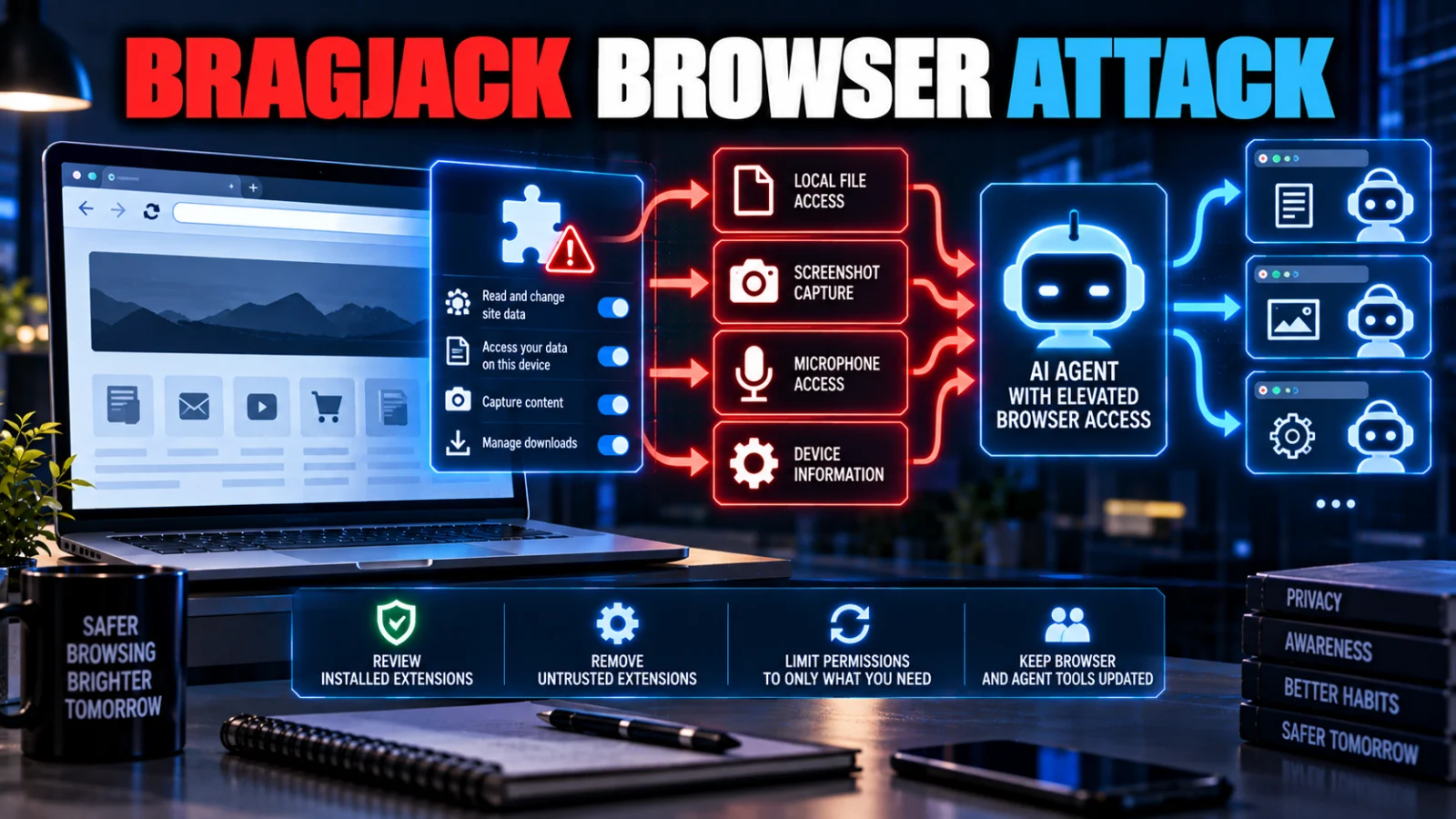
The BragJack browser attack does not mean a clean browser can be remotely hijacked with no prerequisite. Forever Security’s research required a malicious or compromised browser extension to already be installed. Once that condition was met, the researchers demonstrated product-specific ways for the extension to cross into privileged AI-agent behavior without another victim click.
Are you affected by the BragJack browser attack?
Your exposure depends on the exact browser or AI-agent product, whether a malicious or compromised extension was present, and whether you were running a vulnerable product state. Chrome and Edge have public version-specific remediation evidence. Forever Security and current reporting say the findings affecting Perplexity Comet, Opera Neon and Claude in Chrome were acknowledged and addressed, but TPS did not recover equally specific public fixed-build evidence for all three.
What is BragJack?
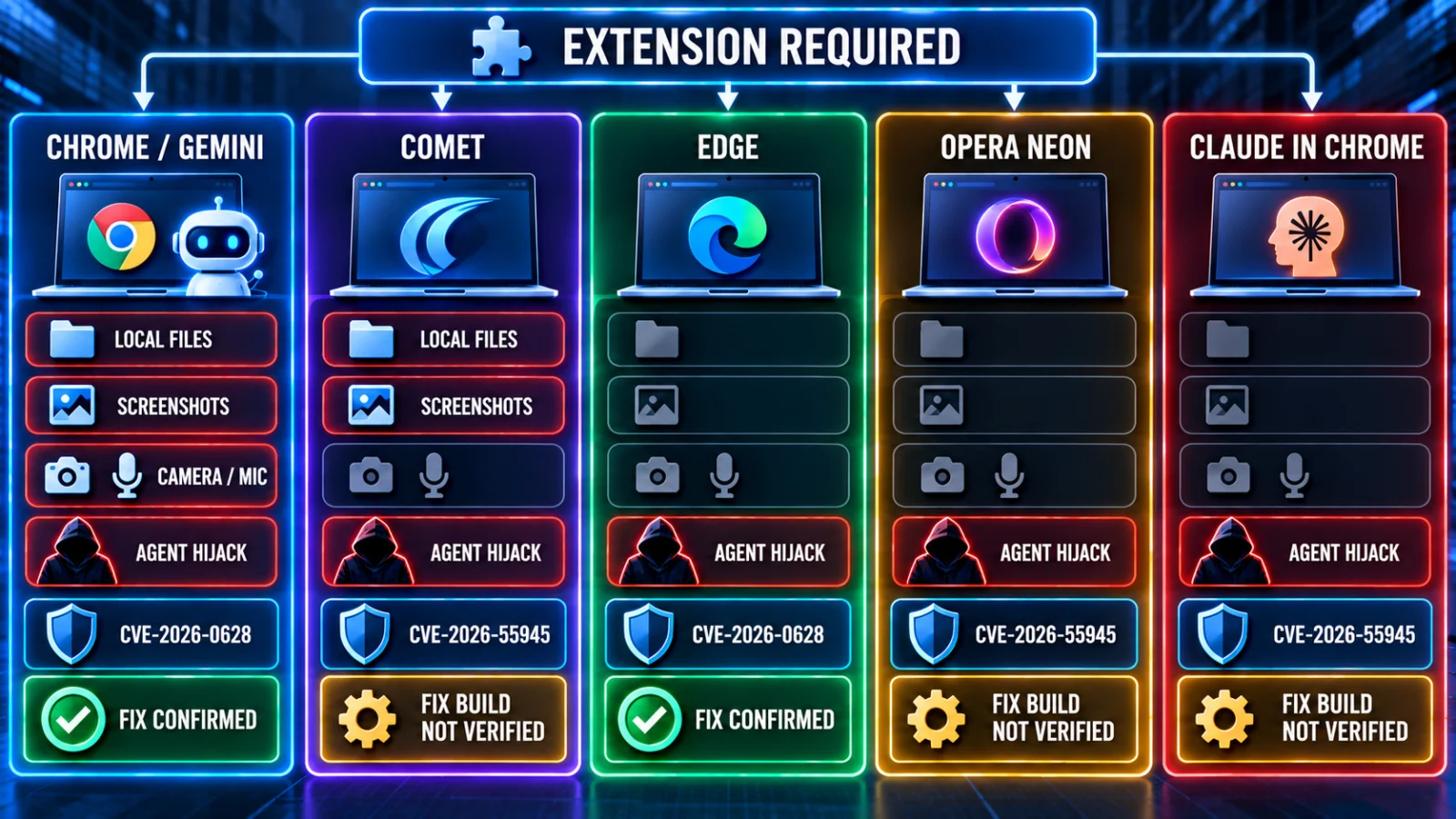
BragJack is Forever Security’s name for a set of browser-agent trust failures demonstrated across five Chromium-based environments: Gemini Live in Chrome, Perplexity Comet, Microsoft Edge, Opera Neon and Claude in Chrome.
The underlying bugs were not identical. The common security pattern was that an ordinary browser extension could manipulate a page, channel or browser state that a more privileged AI agent trusted. The agent could then perform actions with authority beyond what the extension would normally receive by itself.
Does BragJack work without installing an extension?
No. The research depends on a malicious or compromised extension already being present. Google’s description of CVE-2026-0628 also includes malicious-extension installation as a prerequisite.
This is why the phrase zero-click needs qualification. In the demonstrated chains, no additional victim click was needed after the extension was installed and positioned to abuse the relevant trust path. It does not mean a remote attacker can compromise an otherwise clean browser merely by sending a page or message.
Which products were affected, and what did Forever Security demonstrate?
| Product | Demonstrated capability | CVE | Current public fix evidence |
|---|---|---|---|
| Chrome / Gemini Live | Local-file access, browser/profile data, screenshots and camera/microphone capability in the demonstrated chain | CVE-2026-0628 | Google published a fixed Chrome version boundary |
| Perplexity Comet | Local files, browser profile/history, screenshots and agent hijacking in the research | No CVE established in the reviewed material | Vendor acknowledgement/resolution reported; exact public fixed build not recovered by TPS |
| Microsoft Edge | Agent hijacking through the reported Think/Do race condition | CVE-2026-55945 | Microsoft version boundary is publicly recorded |
| Opera Neon | Browser-agent hijacking | No CVE established in the reviewed material | Vendor acknowledgement/resolution reported; exact public fixed build not recovered by TPS |
| Claude in Chrome | Forced prompts and agent hijacking through extension-to-extension trust | No CVE established in the reviewed material | Vendor acknowledgement/resolution reported; exact public fixed build not recovered by TPS |
The matrix is important because the headline capabilities cannot be applied uniformly. Forever Security’s research does not show that every affected product could read local files, activate a camera or access a microphone.
Which BragJack products exposed local files?
Forever Security’s product matrix identifies Chrome/Gemini and Perplexity Comet as the demonstrated local-file exposure cases. That capability should not be generalized to Edge, Opera Neon or Claude in Chrome from this research.
Which BragJack finding involved camera or microphone access?
The camera and microphone capability was demonstrated in the Chrome/Gemini chain. TPS found no evidence in the completed research supporting the claim that all five affected products exposed those device capabilities.
What is CVE-2026-0628?
CVE-2026-0628 is the Chrome vulnerability associated with the BragJack research. Google classified it as High severity and published the fix in Chrome’s stable desktop channel.
The completed research established that Chrome before 143.0.7499.192 was within the affected boundary. Google’s January stable-channel release provided versions 143.0.7499.192/.193 for supported desktop platforms.
Users should rely on the current Chrome version and security-update channel rather than remaining on the historical minimum fixed build.
What is CVE-2026-55945?
CVE-2026-55945 is the Microsoft Edge finding associated with the BragJack disclosure. The reviewed CVE record describes a race condition affecting Edge versions below 150.0.4078.48 and assigns a CVSS score of 4.2 Medium.
This is an Edge-specific finding. It should not be confused with CVE-2026-0628, which belongs to the Chrome side of the research.
Are Chrome and Edge fixed?
Yes, based on the reviewed version-specific evidence. Google published the Chrome fix for CVE-2026-0628, and the reviewed Microsoft CVE data establishes the Edge fixed-version boundary for CVE-2026-55945.
That does not mean extension risk disappears entirely. Updating removes the demonstrated vulnerable state, while extension governance remains relevant because AI-enabled browsers continue to share an execution environment with third-party extensions.
Are Perplexity Comet, Opera Neon and Claude in Chrome fixed?
Forever Security says the vendors acknowledged the reported findings, and current security reporting says the vendor issues were resolved. However, TPS did not recover dedicated first-party public advisories with exact fixed-build numbers for all three products during this review.
For those products, current vendor release and security guidance should therefore control the answer. TPS should not manufacture version numbers merely to make the matrix look complete.
Is BragJack just prompt injection?
Not in the ordinary sense. Forever Security describes the approach as prompt forcing: the extension manipulates the trusted interface or command context that feeds the browser agent instead of simply hiding hostile instructions in ordinary webpage content for a model to read.
That distinction matters because the security failure is not only about whether an AI model follows untrusted text. It is also about whether a lower-privilege extension can tamper with the channel that the privileged agent treats as authoritative.
Was BragJack exploited in the wild?
No evidence reviewed by TPS established active malicious exploitation in the wild. The available evidence is security research and vendor remediation, not a confirmed campaign involving deployed malicious extensions abusing these exact chains.
That may change if vendors, extension stores or incident-response teams later publish exploitation evidence. Such a development would materially change this article’s risk state and should update the same URL.
What should individual users do now?
Update Chrome and Edge
Use the current stable releases. Do not remain on the historical vulnerable version boundaries associated with CVE-2026-0628 or CVE-2026-55945.
Keep AI-browser products current
Update Perplexity Comet, Opera Neon and Claude in Chrome through their current vendor-supported channels because exact public historical fix builds were not established for all three in this review.
Remove extensions you do not need
Delete unknown, abandoned or unnecessary extensions. BragJack’s prerequisite makes extension presence part of the exposure decision.
Review broad permissions
Pay particular attention to extensions with broad site access, request-modification capability or other permissions that can alter pages and browser traffic.
What should enterprise security teams review?
Enterprise browser policy should treat extensions and AI agents as one combined endpoint trust problem rather than two unrelated controls.
Inventory AI-enabled browsers
Identify browser-native and extension-based agents that can access tabs, files, screenshots, local resources or external services.
Enforce extension allowlists
Restrict unapproved extensions on systems where AI browser agents have meaningful local or enterprise authority.
Audit network and host permissions
Review broad host permissions and request-modification APIs such as declarativeNetRequest because an extension’s ability to rewrite trusted browser content can become more consequential when an AI agent consumes that content.
Model the agent’s real blast radius
Ask what the AI agent can reach if its command boundary is manipulated: files, internal tabs, screenshots, credentials, cloud applications, repositories or device capabilities.
How do you verify that the BragJack exposure is resolved?
For Chrome and Edge, the strongest available proof is version state: the endpoint should be running a vendor-fixed release newer than the affected boundary. That is more reliable than assuming a background update completed successfully.
For Comet, Opera Neon and Claude in Chrome, this R&D did not establish equivalent public fixed-build evidence. Verify the current vendor-supported release and any security guidance available for the installed product.
Resolution also requires checking the extension prerequisite. Removing a suspicious extension can reduce exposure, but extension removal should not substitute for installing vendor security updates where a product vulnerability was confirmed.
BragJack browser attack: direct answers
Can BragJack compromise a clean browser without an extension?
No such capability was established. The demonstrated attacks require a malicious or compromised extension to already be installed.
Does zero-click mean no installation is needed?
No. Zero-click describes the lack of additional user interaction after the prerequisite extension is present.
Did every affected AI browser expose local files?
No. Forever Security’s matrix identifies Chrome/Gemini and Perplexity Comet for local-file access in the demonstrated research.
Did every product expose the camera and microphone?
No. Those capabilities were demonstrated in the Chrome/Gemini chain, not across all five products.
Are Chrome and Edge still vulnerable on current updated builds?
The reviewed vendor/CVE evidence shows fixes were released for the demonstrated Chrome and Edge findings. Users should still verify they are actually running current supported builds.
Are all five exact fixed versions publicly confirmed?
No. TPS recovered strong version-specific evidence for Chrome and Edge but not equivalent first-party build-level advisories for Comet, Opera Neon and Claude in Chrome.
Verification method
ThePulseSignal reviewed Forever Security’s original BragJack research, Google’s Chrome release evidence for CVE-2026-0628, the reviewed CVE record for Microsoft’s CVE-2026-55945 and current security reporting. TPS reconciled product-specific capabilities separately instead of treating all five findings as one universal exploit.
Limitations
Exact first-party fixed-build advisories for Perplexity Comet, Opera Neon and Claude in Chrome were not recovered in this research. No active exploitation was established, and the prevalence of malicious extensions capable of reproducing the demonstrated chains remains unknown.