






If your WordPress site runs Forminator 1.57.1 or an older release, update it. WordPress.org still lists Forminator 1.57.2 as the current release, and current vulnerability records continue to place versions through 1.57.1 inside the affected range for CVE-2026-82220.
The technical picture is also clearer than it was when the vulnerability first appeared. Patchstack identifies CVE-2026-82220 as an unauthenticated vulnerability affecting Forminator through 1.57.1, while current WordPress vulnerability databases describe the flaw as an unauthenticated payment bypass. Version 1.57.2 remains the patched release.
Bottom line: update Forminator to 1.57.2 or a later vendor-supported release. Do not stop at 1.56.2, 1.57.0, an intermediate 1.57.0.x build or 1.57.1.
What is the current safe update target for Forminator?
As of September 7, 2026, WordPress.org lists 1.57.2 as the current Forminator release.
The changelog records two security releases on August 27:
- 1.57.1.1 — security improvements
- 1.57.2 — security improvements
Patchstack identifies CVE-2026-82220 as affecting versions through 1.57.1 and lists 1.57.2 as patched. WPScan’s current Forminator vulnerability history describes the same affected boundary and fix as an unauthenticated payment-bypass issue.
For administrators choosing one practical target, move to 1.57.2 or any later vendor-supported release rather than selecting the minimum patch associated with one older CVE.
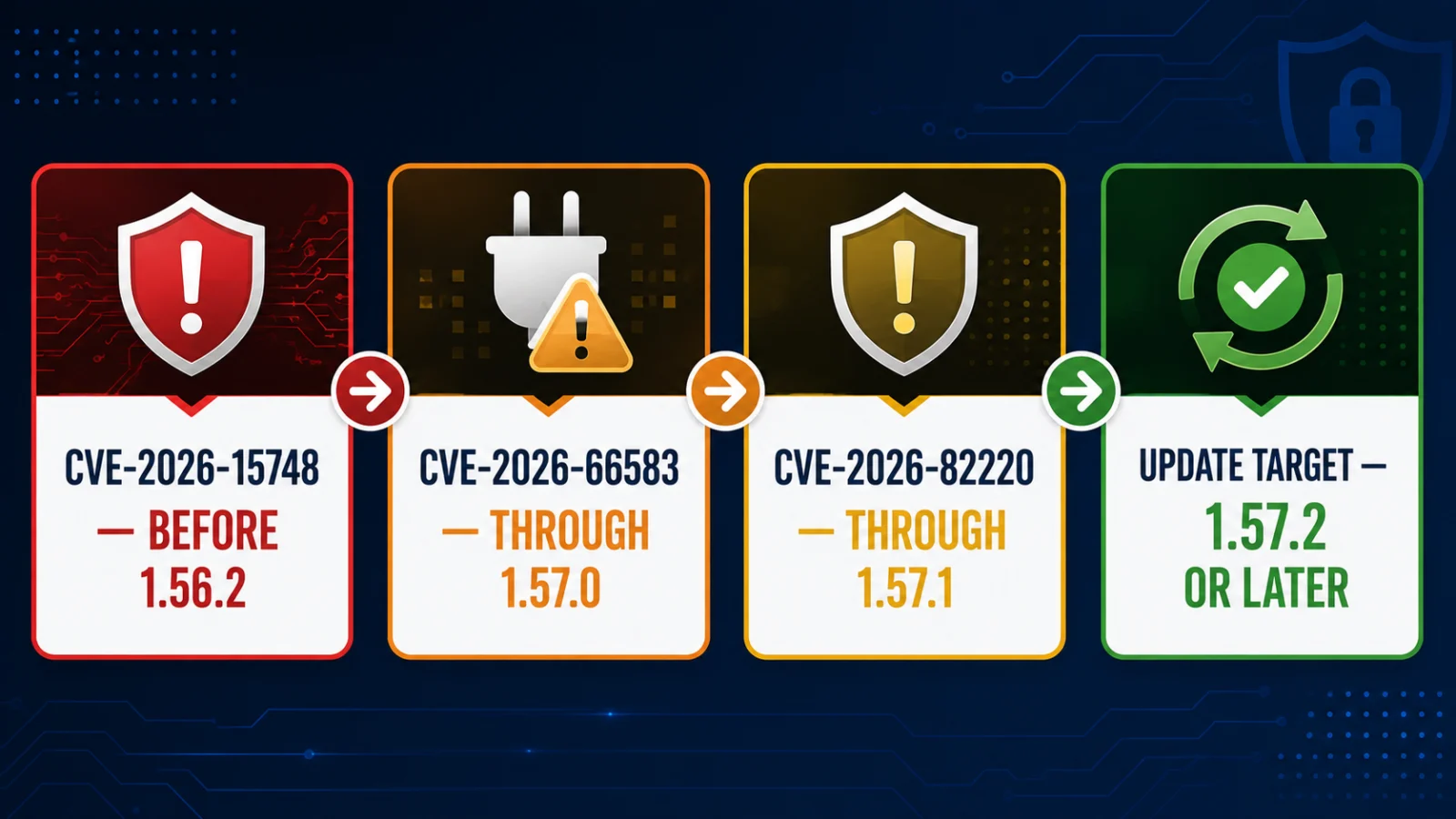
Which Forminator versions are affected by the main August 2026 vulnerabilities?
Several Forminator security issues were disclosed with different affected-version ranges.
| Vulnerability | Affected versions | Main issue | Fix position |
|---|---|---|---|
| CVE-2026-15748 | Before 1.56.2 | Unauthenticated arbitrary file upload with potential code execution | Fixed in 1.56.2 |
| CVE-2026-66583 | Up to and including 1.57.0 | Unauthenticated PHP Object Injection | 1.57.1 is outside this affected range |
| CVE-2026-19221 | Before 1.57.0.5 | Multisite privilege-control flaw with network-wide code-execution impact | Fixed in 1.57.0.5 |
| CVE-2026-19222 | Before 1.57.0.7 | Registration-form role restriction bypass | Fixed in 1.57.0.7 |
| CVE-2026-82220 | Up to and including 1.57.1 | Unauthenticated payment bypass / integrity-impact vulnerability | Patched in 1.57.2 |
The different boundaries are why administrators should use the latest supported security release rather than trying to stop at the lowest version that fixes one particular CVE.
Why is Forminator 1.57.1 no longer the update endpoint?
Version 1.57.1 remains outside the affected range for CVE-2026-66583, but that does not make it the current endpoint.
The vendor released 1.57.1.1 and 1.57.2 on August 27 with additional security improvements. Patchstack then published CVE-2026-82220 on August 28, listing versions through 1.57.1 as affected and 1.57.2 as patched.
Practical consequence: a site already on 1.57.1 is outside the earlier CVE-2026-66583 range but should still update to 1.57.2 or later because a separate later vulnerability includes 1.57.1.
Why does CERT-In mention Forminator 1.56.2?
CERT-In Vulnerability Note CIVN-2026-0414, issued on August 19, 2026, addresses CVE-2026-15748.
CERT-In says the vulnerability affects Forminator versions prior to 1.56.2 and arises from insufficient file-type validation in the plugin’s upload handling. Successful exploitation could allow arbitrary file upload and potentially arbitrary code execution.
WordPress.org’s changelog confirms that version 1.56.2 fixed an arbitrary file-upload vulnerability.
That boundary applies to CVE-2026-15748 only. Version 1.56.2 remains older than several later Forminator security releases and should not be treated as the current endpoint.
For wider Indian cyber-risk context, see ThePulseSignal’s CERT-In Cyber Threats 2026 analysis.
Why is Forminator 1.57.0 still vulnerable?
CVE-2026-66583 affects Forminator versions up to and including 1.57.0 and is classified as an unauthenticated PHP Object Injection vulnerability.
The NVD record marks 1.57.1 as outside that affected range.
That remains an important distinction:
- 1.56.2 addressed the older arbitrary file-upload issue
- 1.57.0 is affected by CVE-2026-66583
- 1.57.1 is outside the CVE-2026-66583 range
- 1.57.2 is the current release and addresses a later issue affecting versions through 1.57.1
What are CVE-2026-19221 and CVE-2026-19222?
These are separate privilege-related vulnerabilities.
CVE-2026-19221: Multisite network-wide privilege impact
CVE-2026-19221 affects Forminator versions before 1.57.0.5. NVD describes a Multisite authorization issue allowing an administrator of an individual site to access a network-wide setting and potentially execute arbitrary code across the network.
This is an authenticated privilege problem and should not be confused with the unauthenticated CVE-2026-66583 issue.
CVE-2026-19222: Registration-role restriction bypass
CVE-2026-19222 affects versions before 1.57.0.7. NVD says the plugin did not consistently enforce the role restriction applied to registration forms, allowing a form builder with sufficient permissions to configure a registration form that could assign the administrator role to a registering visitor.
Both affected ranges end before 1.57.2.
What is CVE-2026-82220?
CVE-2026-82220 was published on August 28 and affects Forminator versions up to and including 1.57.1.
Patchstack lists the issue as unauthenticated, CVSS 5.3, low priority in its own WordPress-specific priority system and patched in 1.57.2.
The CVE record classifies the weakness as authentication bypass by capture-replay and records network reachability, no required privileges and limited integrity impact.
Current WPScan and other WordPress vulnerability records describe the practical flaw as an unauthenticated payment bypass. That means an attacker may be able to bypass payment enforcement in affected Forminator payment workflows.
Do not overstate the risk: current public evidence supports payment-bypass and limited-integrity impact. It does not establish arbitrary code execution, database compromise or full administrator takeover from CVE-2026-82220 alone.
What about the August 25 Stripe-related XSS CVE?
NVD published CVE-2026-18328 on August 25. It affects Forminator versions up to and including 1.57.0 and involves DOM-based reflected Cross-Site Scripting associated with the Stripe Checkout Sessions payment flow.
The NVD record points to changes between 1.57.0 and 1.57.0.1, so this issue does not move the current update target beyond 1.57.2.
It does add another reason not to remain on Forminator 1.57.0 or an older release.
What is PHP Object Injection?
PHP Object Injection occurs when an application unsafely processes attacker-controlled serialized PHP data.
For CVE-2026-66583, the vulnerability can be triggered remotely without authentication or user interaction.
However, PHP Object Injection does not automatically mean every vulnerable WordPress site can immediately be taken over.
Higher-impact exploitation can depend on whether a usable PHP object or POP gadget chain exists through Forminator, another installed plugin, the active theme or another PHP component on the site.
If such a chain exists, object injection may potentially be escalated into effects such as code execution, SQL injection or path traversal. Without a suitable chain, other security effects can still occur.
Does CVE-2026-66583 require a logged-in WordPress account?
No. The vulnerability is described as unauthenticated.
An attacker does not need a normal WordPress account before attempting to reach the vulnerable functionality.
Is Forminator 1.56.2 safe?
Not as a current security endpoint.
Version 1.56.2 fixed CVE-2026-15748, but later Forminator vulnerabilities affect versions newer than 1.56.2.
Administrators should move to 1.57.2 or a later vendor-supported release.
Is Forminator 1.57.0 safe?
No. CVE-2026-66583 explicitly includes Forminator 1.57.0 in its affected range. CVE-2026-18328 also affects versions through 1.57.0.
Is Forminator 1.57.1 safe enough to stop updating?
No.
Version 1.57.1 is outside the affected range for CVE-2026-66583, but CVE-2026-82220 includes versions through 1.57.1. Update to 1.57.2 or a later vendor-supported release.
What if you are running an intermediate 1.57.0.x release?
Several intermediate releases contain individual security fixes, but later builds addressed additional vulnerabilities.
The August 18 sequence included:
- 1.57.0.1 — Cross-Site Scripting security fix
- 1.57.0.2 — Cross-Site Scripting security fix
- 1.57.0.3 — Cross-Site Scripting security fix
- 1.57.0.4 — Cross-Site Scripting security fix
- 1.57.0.5 — Hub-Connector security improvements
- 1.57.0.6 — PHP Object Injection fix
- 1.57.0.7 — privilege-escalation fix
- 1.57.0.8 — payment-processing security fix
- 1.57.1 — Multisite site-registration security fix
WordPress.org then released 1.57.1.1 and 1.57.2 on August 27 with further security improvements.
Administrators should therefore update to the current supported release instead of choosing one intermediate build as a permanent endpoint.
How to check and update Forminator
- Sign in to the WordPress administration dashboard.
- Open Plugins and locate Forminator.
- Check the installed version shown with the plugin entry.
- If it is below 1.57.2, check for the current Forminator update.
- Back up the site using your normal maintenance procedure.
- Install the current vendor-supported Forminator release.
- Confirm the installed version after the update completes.
- Test important forms, registration flows and payment workflows.
If the dashboard does not offer the current release even though WordPress.org lists it, investigate plugin-update configuration or obtain the current release through the official WordPress.org distribution rather than an untrusted download source.
Should you disable Forminator if you cannot update immediately?
Applying the current patched release is the preferred remediation.
If a site cannot update promptly, temporarily disabling vulnerable Forminator functionality can reduce exposure. A web application firewall or access restrictions may also reduce some attack opportunities depending on the vulnerability and site configuration.
These are temporary risk-reduction measures, not substitutes for applying the vendor security update.
Was every vulnerable Forminator site compromised?
No.
A vulnerable version establishes exposure to a security flaw. It does not prove successful exploitation of a specific website.
The reviewed sources do not establish that every affected site was exploited, and the vulnerability records should not be used as proof of compromise by themselves.
What should previously exposed sites check?
After updating, administrators whose sites spent time on vulnerable releases can review the environment for unexplained changes.
- unexpected administrator accounts
- unexpected role changes
- unexplained files in upload or plugin directories
- plugin or theme changes administrators did not make
- unexpected scheduled tasks or server-side files
- unusual redirects or injected content
- hosting or security logs showing suspicious requests
Multisite installations, registration forms and payment forms deserve extra attention because different August vulnerabilities affected those areas.
These checks are prudent exposure-review steps; finding an old vulnerable version does not itself establish compromise.
Does updating Forminator update WordPress itself?
No. Forminator is a WordPress plugin.
Updating Forminator changes the plugin version, not WordPress core. Administrators should separately maintain WordPress core, themes and other plugins.
What WordPress owners should do now
- Check the installed Forminator version.
- If it is older than 1.57.2, update to 1.57.2 or the latest vendor-supported release.
- Do not stop at 1.56.2 because it only addresses an older vulnerability boundary.
- Do not treat 1.57.0 as safe because multiple vulnerability records include it.
- Do not treat 1.57.1 as the current endpoint because CVE-2026-82220 affects versions through 1.57.1.
- Confirm the update completed successfully.
- Test important forms, registration flows and payment workflows.
- If the site spent time on an affected version, review accounts, files, role changes and logs for unexplained activity.
Related cybersecurity guidance from ThePulseSignal
- CERT-In Cyber Threats 2026: 5 Key Numbers Behind Finance & Healthcare Risk
- Apple Threat Notification in India: Is It Real, Is Your iPhone Hacked, and What to Do Next
Official and reviewed sources
- CERT-In Vulnerability Note CIVN-2026-0414
- WordPress.org — Forminator current release and changelog
- NVD — CVE-2026-66583
- NVD — CVE-2026-19221
- NVD — CVE-2026-19222
- NVD — CVE-2026-18328
- Patchstack — CVE-2026-82220
- WPScan — Forminator vulnerability history
How this article was verified
ThePulseSignal checked WordPress.org’s current Forminator release and changelog, CERT-In’s Forminator advisory, NVD vulnerability records, Patchstack and WPScan on September 7, 2026.
WordPress.org continues to list 1.57.2 as the current release. Patchstack lists CVE-2026-82220 as affecting versions through 1.57.1, requiring no authentication and patched in 1.57.2. Current WPScan vulnerability data describes the flaw as an unauthenticated payment bypass.
The older vulnerability boundaries remain separately relevant: CVE-2026-66583 affects versions through 1.57.0, CVE-2026-19221 affects versions before 1.57.0.5, CVE-2026-19222 affects versions before 1.57.0.7 and CERT-In’s CVE-2026-15748 advisory applies before 1.56.2.
Last verified: September 7, 2026.
Limitations and unresolved points
- WordPress.org describes the August 27 releases as security improvements without publicly detailing every fixed issue.
- Patchstack’s public CVE-2026-82220 page broadly labels the vulnerability type even though the CVE record and current WordPress vulnerability databases provide additional classification detail.
- No reviewed source establishes active exploitation of CVE-2026-82220 in the wild.
- A vulnerable Forminator version does not prove compromise of a specific site.
- Impact can vary by WordPress configuration, privileges, enabled Forminator features and other installed components.
- A newer vendor release may supersede 1.57.2 after this check, so administrators should prefer the latest supported security release rather than treating 1.57.2 as a permanent endpoint.
Frequently asked questions
What is the latest Forminator security version?
WordPress.org lists Forminator 1.57.2 as the current release as of September 7, 2026.
Is Forminator 1.57.0 vulnerable?
Yes. CVE-2026-66583 affects Forminator through version 1.57.0.
Is Forminator 1.57.1 still the recommended endpoint?
No. CVE-2026-82220 affects versions through 1.57.1 and is patched in 1.57.2.
What does CVE-2026-82220 allow?
Current WordPress vulnerability databases describe it as an unauthenticated payment bypass affecting Forminator through 1.57.1. Patchstack rates it CVSS 5.3 and lists 1.57.2 as patched.
What version fixes CVE-2026-82220?
Forminator 1.57.2 is the patched version listed by Patchstack and current WordPress vulnerability databases.
What version fixes CVE-2026-66583?
Version 1.57.1 is outside that CVE’s affected range, but administrators should use 1.57.2 or later because a newer vulnerability also affects 1.57.1.
Is Forminator 1.56.2 safe?
It fixes the separate CVE-2026-15748 issue but is not the current security endpoint. Update to 1.57.2 or a later supported release.
Was every affected WordPress site hacked?
No. Running a vulnerable version proves exposure, not compromise.