







After an infostealer infection, infostealer credential rotation should not stop at changing a few passwords. Modern credential-stealing malware can target saved passwords, browser sessions, authentication tokens, developer secrets, cloud credentials and other locally accessible identity material.
The recovery question is therefore: what could the infected device access, and what invalidation action is required for each exposed artifact?
Direct answer
What should you rotate after an infostealer infection?
From a known-clean device, reset passwords that were stored or used on the infected endpoint, revoke active sessions and refresh tokens where relevant, rotate exposed API or cloud keys, replace compromised SSH or application secrets and regenerate exposed recovery material. Do not blindly rotate unrelated credentials that had no plausible exposure path.
Critical first step
Do not enter new passwords into an endpoint that may still be stealing them
Isolate and remediate the infected system first. Sensitive credential recovery should be performed from a separate trusted device until the affected endpoint is known to be clean.
State 1
Device compromised
An infostealer executed or infection evidence indicates the endpoint should not be trusted.
State 2
Credential exposed
Passwords or reusable login material were stored, typed or accessible on the device.
State 3
Session or secret exposed
Authenticated sessions, API keys, cloud credentials, SSH keys or other non-password artifacts may be usable independently.
State 4
Access invalidated
Relevant credentials, sessions and secrets have been revoked or replaced and suspicious use has been reviewed.
In this guide
- What to do first
- What infostealers can target
- Define the exposure window
- Credential rotation matrix
- Which passwords to reset first
- Why password reset does not end every session
- Access and refresh tokens
- Developer and cloud secrets
- SSH keys and certificates
- Service accounts and non-human identities
- MFA and recovery material
- Financial and wallet data
- What not to rotate automatically
- Check whether stolen credentials were used
- Watch, rotate or escalate
- Worked developer-laptop example
- Related TPS cybersecurity guides
- Verification boundaries
- Limitations
- FAQs
Remediate the endpoint before trusting new credentials
If credential-stealing malware may still be active, changing passwords on the same device can expose the newly created credentials again.
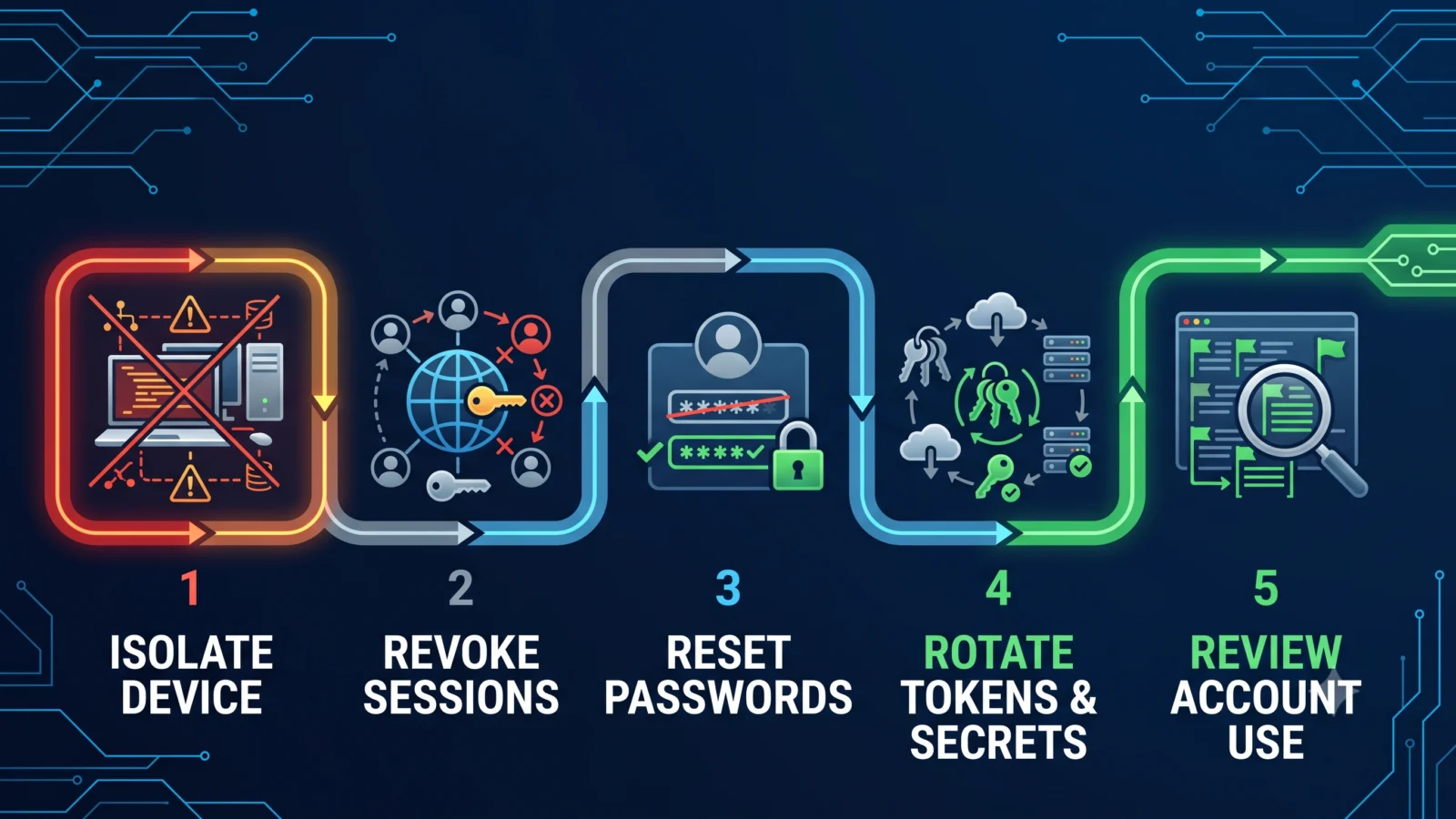
Safer recovery sequence
Microsoft’s RedLine Stealer guidance recommends changing passwords for sensitive accounts from a separate known-clean device and revoking active sessions where appropriate.
Do not treat credential recovery as endpoint remediation. Removing the malware and invalidating what it may already have stolen are separate jobs.
Infostealers can target more than saved passwords
Microsoft, CrowdStrike and Proofpoint have documented infostealers targeting combinations of browser credentials, cookies, session data, tokens, financial information, wallet material and developer secrets.
The exact collection set depends on the malware family and host environment, so do not assume every artifact below was stolen. Instead ask whether each artifact was stored, cached, logged in, mounted, typed or otherwise accessible during the exposure window.
Identity material
Passwords, session cookies, access tokens, refresh tokens and recovery material.
Developer material
API keys, cloud CLI credentials, repository tokens, SSH keys, environment files and service secrets.
Financial material
Payment information, cryptocurrency-wallet material and account sessions depending on the stealer and local data.
Define what was accessible during the infection window
Credential rotation should be scoped by exposure, not panic.
Build a simple inventory of what the device could access from the earliest plausible infection time until it was isolated or rebuilt:
- browser profiles and saved passwords;
- accounts with active browser sessions;
- password managers unlocked or accessible on the device;
- developer shells, IDEs and credential helpers;
- cloud CLI profiles;
- environment files and application configuration;
- SSH keys;
- repository and package-registry tokens;
- VPN or corporate access credentials;
- local files containing secrets;
- financial or wallet applications.
Known accessible
Treat the associated credential or secret as exposed and apply the appropriate revocation or rotation action.
No plausible exposure path
Do not automatically rotate unrelated organisation-wide credentials merely because one endpoint was infected.
Use the right invalidation action for each stolen artifact
| Artifact | Primary action | Why password reset alone may not solve it |
|---|---|---|
| Account password | Reset or rotate | The old password remains reusable until changed. |
| Browser session cookie | Revoke active sessions | A valid authenticated session may continue without asking for the password again. |
| Refresh token | Revoke the token/session | It can potentially obtain fresh access tokens independently of the password. |
| API key | Create replacement, update dependencies, disable old key | API keys normally authenticate independently from the user’s interactive password. |
| Cloud access credential | Rotate or disable old credential | CLI or programmatic keys can remain valid after an account-password change. |
| OAuth/app secret | Rotate secret and review application access | The secret belongs to an application identity, not the interactive user password. |
| SSH private key | Replace key and remove old trust where applicable | Changing an account password does not revoke key-based authentication. |
| MFA recovery code | Regenerate recovery codes | A copied recovery code can remain a separate authentication path. |
| Untrusted MFA method | Remove and re-register trusted method | Password reset does not remove a maliciously added authentication method. |
| Wallet seed/private key | Treat the cryptographic key itself as compromised | There may be no password reset capable of revoking a copied private key. |
Reset high-leverage passwords first
When many accounts may be exposed, prioritise credentials that can unlock other systems or recovery paths.
Practical password priority
Primary email and identity-provider accounts often deserve early attention because they can participate in password-reset or account-recovery flows for other services. Privileged administrator accounts should also be treated with high urgency.
Prioritisation is environment-specific. An organisation may have different critical identity dependencies, so use the actual access graph rather than assuming one universal order.
Changing a password does not necessarily invalidate every stolen browser session
A session cookie or authentication token can represent an already authenticated user. If an attacker steals and successfully replays that artifact, the service may not require a fresh password or MFA challenge for that session.
Microsoft’s session-cookie and token-theft guidance treats password reset and session/token revocation as separate remediation steps.
Password exposed
Reset the password and review account activity.
Session exposed
Revoke active sessions or tokens as supported by the service, in addition to any required password reset.
MFA does not make a stolen authenticated session harmless. A valid session may represent an authentication flow in which MFA was already satisfied.
Access tokens and refresh tokens need token-specific remediation
Tokens are not interchangeable with passwords.
Depending on the identity platform, recovery can involve:
- revoking active refresh tokens;
- forcing sign-out of active sessions;
- removing suspicious devices;
- revoking application consent or access where relevant;
- requiring fresh authentication after the compromised session is invalidated.
The exact controls depend on the platform. Follow the identity provider’s documented incident-recovery process rather than assuming a password change automatically revokes every token.
Developer laptops can expose API keys, cloud credentials and repository secrets
An infostealer on a developer workstation can create a much broader problem than consumer password theft.
Microsoft’s 2026 research on infostealer and malicious-package campaigns highlights exposure of developer and environment credentials. Potentially accessible material can include:
- GitHub or GitLab tokens;
- npm, PyPI or other package-registry tokens;
- AWS, Azure or Google Cloud credentials;
- cloud CLI profiles;
- Kubernetes credentials;
- database connection secrets;
- local environment files;
- CI/CD credentials stored or exposed on the workstation;
- application secrets;
- SSH private keys.
TPS rule: do not mark every corporate secret compromised because a developer laptop was infected. Determine which credentials were actually accessible from that workstation, then rotate or revoke those artifacts.
If the concern began with a malicious package rather than a general infostealer infection, see ThePulseSignal’s malicious npm package verification guide.
SSH keys and cryptographic credentials cannot be fixed by changing a password
If an SSH private key was copied, changing the user’s account password does not invalidate key-based authentication.
Recovery may require:
- creating a new key pair;
- deploying the new public key where access is still needed;
- removing the old public key from authorised locations;
- checking whether the old key was used during the exposure window;
- rotating any passphrase if the old private key itself remains relevant during transition.
The same principle applies broadly to cryptographic credentials: invalidate the compromised trust mechanism itself.
Service accounts and non-human identities need coordinated rotation
API keys, service principals, application secrets and database credentials can be production dependencies.
Microsoft’s 2026 compromised-identity guidance distinguishes human users from non-human identities and warns that service credentials may require coordination with the owning application or service.
Do not blindly disable a production service credential without understanding its dependencies. Emergency rotation may require a replacement credential, application update, dual-key overlap or coordinated deployment before the old credential is disabled.
User credential
Often supports direct password reset and session revocation.
Application credential
May require configuration or deployment changes before the old secret can be retired.
Shared infrastructure secret
May affect multiple services and needs controlled coordinated rotation.
Check MFA recovery codes and authentication methods separately
MFA is valuable, but the recovery action depends on what was exposed.
| Exposure | Typical response |
|---|---|
| Password only | Reset password and review account activity; MFA remains an additional control. |
| Authenticated session/token | Revoke the session or token as well as resetting credentials where appropriate. |
| Recovery codes accessible | Regenerate recovery codes. |
| Authentication method unexpectedly added or changed | Remove untrusted methods and re-register trusted authentication methods. |
Financial and cryptocurrency data may require a different response
Infostealers can target payment and cryptocurrency information depending on the malware family.
If a conventional financial account credential or active banking session was exposed, follow the provider’s account-security and fraud process.
A cryptocurrency seed phrase or private key is different: if the cryptographic secret itself was copied, changing an application password does not make the copied key disappear. Treat the wallet secret as compromised and follow the wallet or custody provider’s appropriate migration and security procedure.
Do not assume “change password” protects a copied private key. The exposed cryptographic secret may remain independently usable.
Do not rotate every credential in the organisation without an exposure path
Mass rotation can cause outages and consume incident-response time without necessarily reducing risk.
Rotate / revoke
Known exposed
The artifact was stored, cached, used or otherwise accessible from the compromised endpoint.
Investigate
Exposure unknown
The endpoint may have had access but available evidence does not yet establish whether the credential was reachable.
Coordinate
Production dependency
The secret should be replaced, but service owners must coordinate the change safely.
Do not assume
No plausible exposure
An unrelated credential should not be declared compromised merely because one endpoint was infected.
After rotation, check whether the stolen material was already used
Rotation stops future use of the old credential once invalidation takes effect. It does not tell you whether an attacker used the credential before you revoked it.
Review the relevant service’s available evidence for the exposure window, which may include:
- authentication history;
- unfamiliar sessions or devices;
- new MFA methods;
- password or recovery changes;
- API-key usage;
- repository activity;
- cloud audit logs;
- privilege changes;
- new applications or OAuth consent;
- unusual downloads or data access.
For the broader distinction between fixing a vulnerability and determining whether attackers already gained access, see ThePulseSignal’s compromise-assessment guide.
Watch, rotate or escalate
1
WATCH
The device is remediated, exposed artifacts have been invalidated and account or service logs show no additional suspicious activity requiring escalation.
2
ROTATE
A password, session, token, key or secret was accessible from the infected endpoint and the old artifact is still valid or cannot be trusted.
3
ESCALATE
Privileged credentials, production service identities, cloud-admin access, financial assets or evidence of attacker use are involved.
Worked example: developer laptop infected by an infostealer
Assume a developer laptop was infected while the user was logged into email, GitHub and a cloud CLI, and the machine also contained an SSH key and local environment files.
| Evidence | Action | Reason |
|---|---|---|
| Email password stored in browser | Reset password and revoke active sessions | Email can be a high-leverage recovery channel and the browser session may remain independently usable. |
| GitHub authenticated session and token accessible | Revoke sessions/tokens and create replacements where needed | A password reset does not necessarily invalidate every separate authentication artifact. |
| Cloud CLI credential present | Rotate or disable the credential and review cloud audit activity | Programmatic credentials can remain valid independently of the user’s password. |
| SSH private key stored locally | Replace key and remove old trust where applicable | The private key is itself an authentication credential. |
| .env contains database password | Coordinate database-secret rotation and update dependent application configuration | The secret may be a production dependency. |
| Unrelated production signing key was never present or reachable | Do not automatically declare it compromised | No exposure path has been established. |
The key principle is accessibility-based rotation: identify what the compromised environment could expose, invalidate those artifacts appropriately, then investigate whether they were used.
Where this fits in the TPS cybersecurity cluster
Security patch installed: is the vulnerability really fixed?
Use this when the question is whether remediation actually removed a software vulnerability across the affected environment.
CISA KEV: does exploited in the wild mean your system was hacked?
Use this when you need to separate known public exploitation from evidence that your own system was compromised.
Verification notes: confirmed, conditional and not established
Confirmed guidance
- Infostealers can target credentials and browser/session material.
- Session or token revocation can be separate from password reset.
- Sensitive password recovery should be performed from a trusted device when the infected endpoint remains untrusted.
- Exposed secrets should be rotated or revoked according to their credential type.
Depends on stealer
- Which browser artifacts were collected.
- Whether cloud or developer credentials were targeted.
- Whether wallet or payment material was accessible.
TPS interpretation
- Credential recovery should be driven by endpoint accessibility rather than organisation-wide panic rotation.
- Passwords, sessions, API keys and cryptographic keys should be treated as different revocation classes.
Not proven by infection alone
- that every credential on the device was stolen;
- that stolen credentials were actually used;
- that unrelated corporate secrets were exposed;
- that password reset automatically invalidated every authentication artifact.
Verification method
ThePulseSignal reviewed Microsoft infostealer research and malware-remediation guidance, Microsoft Defender and security-operations material on session-cookie and token theft, Microsoft compromised-identity recovery guidance, Microsoft supply-chain incident guidance covering accessible developer credentials, and current CrowdStrike, SentinelOne and Proofpoint infostealer research.
The article separates endpoint cleanup, password reset, session revocation, token invalidation, secret rotation and historical-use investigation rather than treating “change your passwords” as a complete recovery plan.
Limitations and important boundaries
No universal infostealer checklist can prove exactly what one infected endpoint lost. Malware family, configuration, browser state, local files, account sessions and collection success all affect the actual exposure.
- Not every infostealer steals every credential type described here.
- Credential accessibility does not prove successful exfiltration, but it can justify precautionary rotation based on risk.
- Password reset behaviour and session revocation differ by identity provider.
- Production API keys and service credentials may require coordinated rotation to prevent outages.
- Wallet private keys and seed phrases require different handling from ordinary account passwords.
- Rotation does not prove that stolen credentials were never used before revocation.
- Incident-response teams should preserve relevant evidence before destructive remediation when investigation or legal requirements make that necessary.
- This guide does not replace vendor-specific incident-response instructions.
Infostealer credential rotation: frequently asked questions
Is changing my passwords enough after an infostealer infection?
No. If browser sessions, refresh tokens, API keys, cloud credentials, SSH keys or other secrets were exposed, those artifacts may require their own revocation or rotation.
Should I change passwords from the infected computer?
Not while the endpoint may still be compromised. Use a known-clean device for sensitive credential recovery until the affected system has been remediated and is trusted again.
Which passwords should I reset first?
Prioritise high-leverage identities such as primary email or identity-provider accounts, privileged administrator accounts, cloud or VPN access and other credentials known to have been stored or used on the infected endpoint.
Does a password change revoke stolen session cookies?
Not necessarily on every service. Use the provider’s session or token-revocation controls where available rather than assuming password reset alone invalidates every active session.
Should I rotate every API key in the company?
No. Identify which keys were stored, cached or otherwise accessible from the compromised endpoint. Rotate exposed keys and investigate unknown exposure based on risk.
What should I do with a stolen SSH private key?
Create a replacement and remove the old key’s authorised trust wherever applicable. Changing the account password does not automatically revoke key-based access.
What if MFA was enabled?
MFA still helps, but an already authenticated session token can represent a session in which authentication requirements were previously satisfied. Revoke compromised sessions and review authentication methods separately.
How do I know if the stolen credential was actually used?
Review the relevant account, identity, cloud, repository or service audit history for the exposure window and look for unfamiliar sessions, authentication events, privilege changes, token use or other suspicious activity.
Bottom line
Effective infostealer credential rotation means identifying what the infected device could access and invalidating each artifact using the correct mechanism.
Best recovery chain: isolate endpoint → use clean device → revoke sessions → reset exposed passwords → rotate tokens, keys and secrets → restore trusted MFA methods → review historical use.
A password change is one recovery action. It is not a universal revocation mechanism for every credential an infostealer may have copied.
Last verified: August 22, 2026. This guide reflects current Microsoft, CrowdStrike, SentinelOne and Proofpoint material on infostealer credential, browser-session, token and developer-secret exposure.