







If you clicked a suspicious link on phone, the click alone does not tell you whether the phone, an online account or your money was compromised. The useful question is what happened next: did you only open the page, enter a password, share an OTP, download or install an app, grant sensitive permissions, or expose banking details?
Direct answer
Does clicking a suspicious link mean the phone is hacked?
Not by itself. NCSC guidance distinguishes a click with no information entered, files downloaded or software installed from incidents where credentials or software were exposed. Diagnose the post-click action before choosing the response.
Critical distinction
Click ≠ credential theft ≠ malware installation
A fake page, a stolen password and an installed malicious APK are different security incidents. They can begin with the same link but require different containment steps.
State 1
Page opened only
No data entered, file installed or unusual permission approved.
State 2
Password or OTP entered
The account or authentication flow may be exposed even if the phone itself is not.
State 3
App installed
Device compromise becomes a stronger concern, especially if sensitive permissions were granted.
In this guide
Clicked a suspicious link on phone: what does that actually prove?
It proves that the browser or another app opened a destination. It does not by itself prove that malware executed, an account was taken over or an attacker gained remote control.
NCSC says that where someone clicked something suspicious but did not enter personal information, download files or install software, further action is unlikely to be necessary, although the user should stay alert for suspicious account activity.
TPS rule: classify the incident from the strongest post-click evidence, not from the fear created by the message.
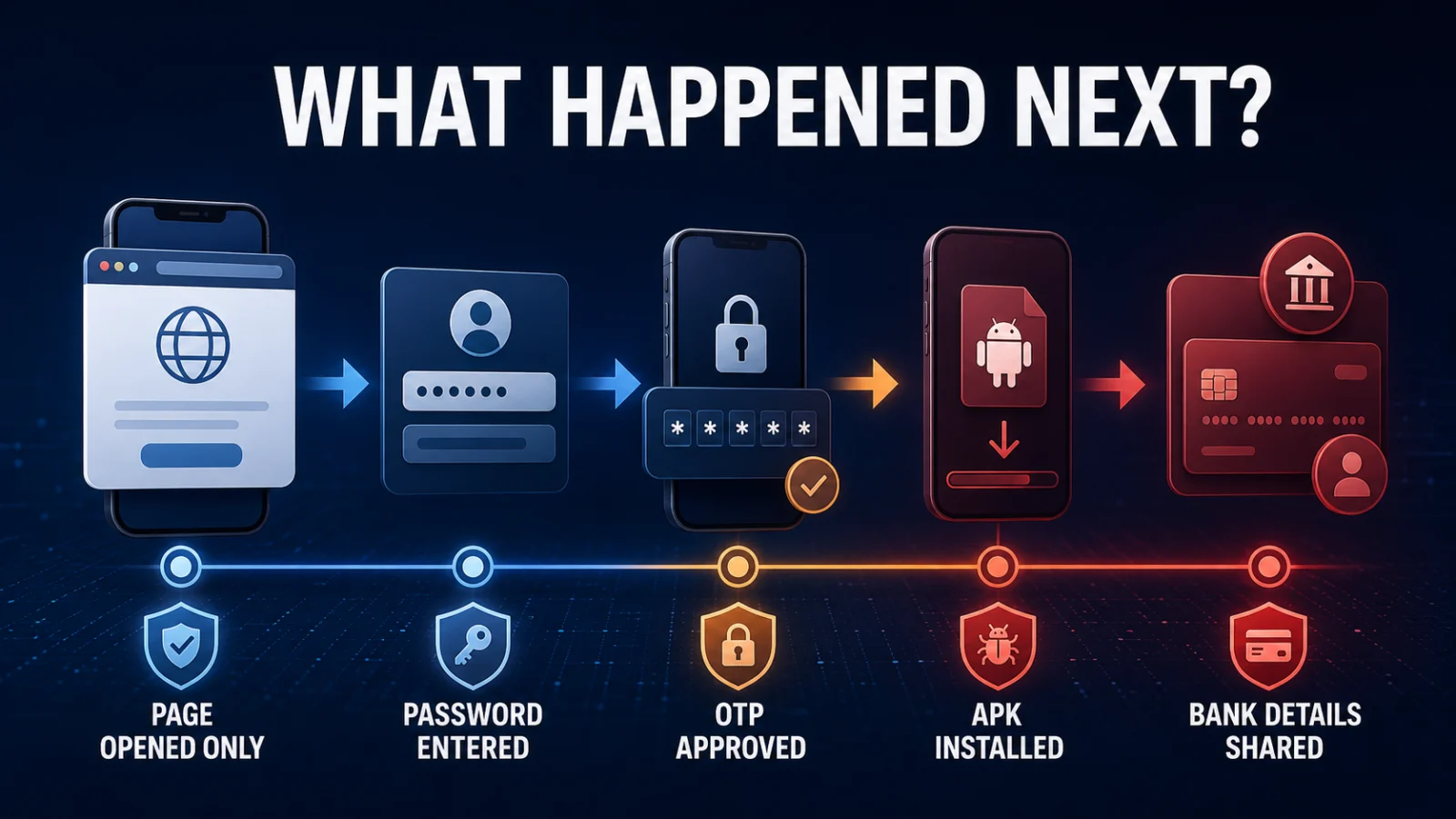
Identify the exposure before taking action
| What happened after the click? | Main risk | First response |
|---|---|---|
| Page opened; nothing entered or installed | Lower-risk browsing event | Close it, update the device/browser and monitor important accounts. |
| Password entered | Credential exposure | Change that password through the legitimate service and review active sessions. |
| OTP / MFA code entered or login approved | Possible active takeover | Secure the affected account and terminate unfamiliar sessions. |
| APK downloaded but not installed | Malicious-file delivery | Do not install it; delete it and inspect downloads. |
| APK or app installed | Possible device malware | Remove the suspicious app, run Play Protect and inspect permissions. |
| Bank/card details entered | Financial fraud exposure | Contact the bank or payment provider immediately. |
If you entered a password or OTP, secure the account first
If you typed a password into the suspicious page, assume that credential may be exposed. Change it from the real service, review recent sign-ins and remove unfamiliar sessions. If the same password was reused elsewhere, rotate those accounts too.
An OTP, verification code or login approval can be more urgent because it may complete an authentication attempt already in progress. If the incident involved WhatsApp verification, use the TPS guide on a WhatsApp verification code you did not request to separate an attempted registration from stronger takeover evidence.
Account exposure does not automatically prove device malware. A phishing page can steal credentials without installing anything on the phone.
Downloaded APK and installed APK are different states
On Android, a scam link may deliver an APK file. A file sitting in Downloads is not the same as an installed application.
CERT-In documented a 2026 India campaign using fake RTO and e-Challan lures that directed victims toward malicious APKs. The meaningful escalation occurs when the app is installed and can obtain access to the device or sensitive information.
APK downloaded
Do not open or install it. Delete the file and keep Play Protect enabled.
APK installed
Uninstall the suspicious app, run a Play Protect scan and inspect any access granted to it.
Google says Play Protect checks apps from Google Play and other sources, can warn about potentially harmful apps, and may disable or remove them.
Sensitive permissions can change the Android risk
If the suspicious app was installed, inspect what it was allowed to do. Pay particular attention to Accessibility, notification access, SMS, screen-sharing or remote-control capability, device administration, overlay permission and the ability to install additional apps.
Installed app + sensitive access is a stronger compromise signal than a link click alone. Remove suspicious access before rebuilding trust in the device.
On iPhone, separate account compromise from configuration changes
If the link opened on an iPhone, check whether you entered an Apple Account password, approved a two-factor code, installed an app or accepted a configuration profile.
Apple says installed configuration profiles can be reviewed under Settings → General → VPN & Device Management. Apple also lists unknown sign-ins, unrequested two-factor codes, unfamiliar trusted devices, unexplained account changes and unrecognised purchases as signs that an Apple Account may be compromised.
Do not remove a legitimate employer or school profile without checking who manages the device.
If banking or card details were entered, treat it as a financial incident
Do not wait to determine whether the whole phone is hacked before protecting exposed financial credentials. Contact the bank, card issuer or payment provider through an official channel and review recent transactions.
For cyber financial fraud in India, the National Cyber Crime Reporting Portal states that victims can report through the portal or call 1930.
Use direct evidence instead of generic hacked-phone symptoms
Battery drain, warmth or sluggish performance can have many ordinary explanations. Stronger post-click evidence includes:
- a suspicious app you installed
- sensitive permissions you granted
- an unfamiliar iPhone configuration profile
- unknown account sessions or devices
- security settings changed without you
- messages or transactions you did not make
- legitimate security warnings from Google, Apple or the affected service.
If the account has actually been taken over, the TPS WhatsApp account-recovery guide shows the same evidence-first principle: determine what control was lost before selecting the recovery lane.
Watch, investigate or escalate after you clicked a suspicious link on phone
1
WATCH
The page opened, but you entered nothing, installed nothing and see no suspicious account activity. Update and monitor.
2
INVESTIGATE
A file downloaded, a permission may have been granted, or account activity is unclear. Inspect the device and affected accounts.
3
ESCALATE
You installed suspicious software, approved authentication, see unknown sessions or transactions, or exposed banking details.
Verification boundary
The guidance separates browser exposure, credential exposure, authentication approval, malicious-app installation and financial exposure because the available primary guidance does not support treating every suspicious-link click as the same incident.
Frequently asked questions
I clicked a phishing link but entered nothing. Am I hacked?
Not necessarily. A click alone is not proof of compromise. If you entered no information, downloaded nothing and installed nothing, the practical risk is lower; remain alert for suspicious activity.
Do I need to change every password?
Not automatically. Prioritise credentials you entered, accounts showing suspicious activity and any other accounts where the exposed password was reused.
Does downloading an APK mean it infected Android?
No. Download and installation are different events. Do not install the file; delete it. If you installed it, inspect permissions and run Play Protect.
Should I factory-reset my phone after one suspicious click?
Not as an automatic first step. Escalate when there is stronger evidence of malware or persistent compromise that cannot be removed through normal supported recovery.
What if I entered an OTP?
Treat the affected account as higher risk because the code may have completed an authentication attempt. Review sessions and security settings immediately.
Bottom line
If you clicked a suspicious link on phone, do not diagnose the incident from the click alone. Determine whether you exposed credentials, approved authentication, installed software, granted sensitive access or shared financial information. That post-click evidence tells you what must be secured next.
Best decision chain: identify what happened after the click → secure the exposed account or payment method → remove suspicious software or permissions if present → review independent evidence of compromise → monitor for recurrence.
Last verified: August 22, 2026. This guide reflects NCSC phishing-response guidance, CERT-In Android-malware advisories, current Google Play Protect guidance, Apple account/profile guidance and India’s cybercrime reporting information reviewed for this article.