






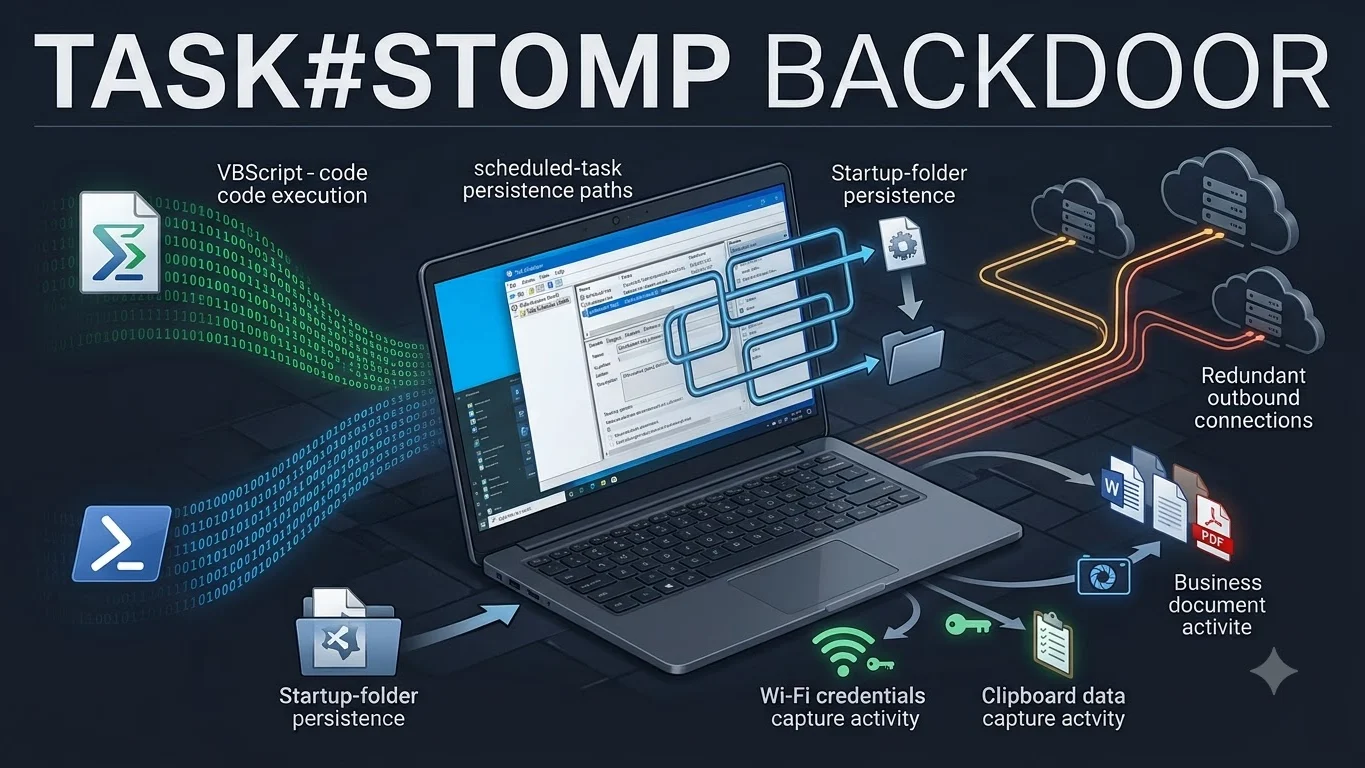
TASK#STOMP PowerShell backdoor is a newly disclosed Windows malware operation that researchers attributed to analysis by Securonix Threat Research. Current reporting says it steals business documents, saved Wi-Fi credentials and clipboard contents, captures screenshots, monitors newly created or modified files and accepts remote commands through redundant command-and-control channels.
The strongest current evidence also shows that TASK#STOMP is built for persistence. It does not rely on one startup mechanism. Reporting based on the Securonix analysis describes four scheduled tasks plus a copy of its script in the Windows Startup folder, meaning partial cleanup can leave another foothold able to restart the infection.
What the TASK#STOMP PowerShell backdoor does
Help Net Security and The Hacker News describe TASK#STOMP as a PowerShell-based Windows backdoor focused on document collection, credential theft, surveillance and remote command execution. The malware searches for business files, uploads them, and continues watching the filesystem so newly created or modified documents can also be collected.
Reported capabilities include stealing saved Wi-Fi passwords, reading clipboard contents, taking screenshots and accepting arbitrary operator commands. That combination makes the infection relevant not only to endpoint security teams but also to incident responders handling possible business-document and credential exposure.
How execution begins on the observed machine
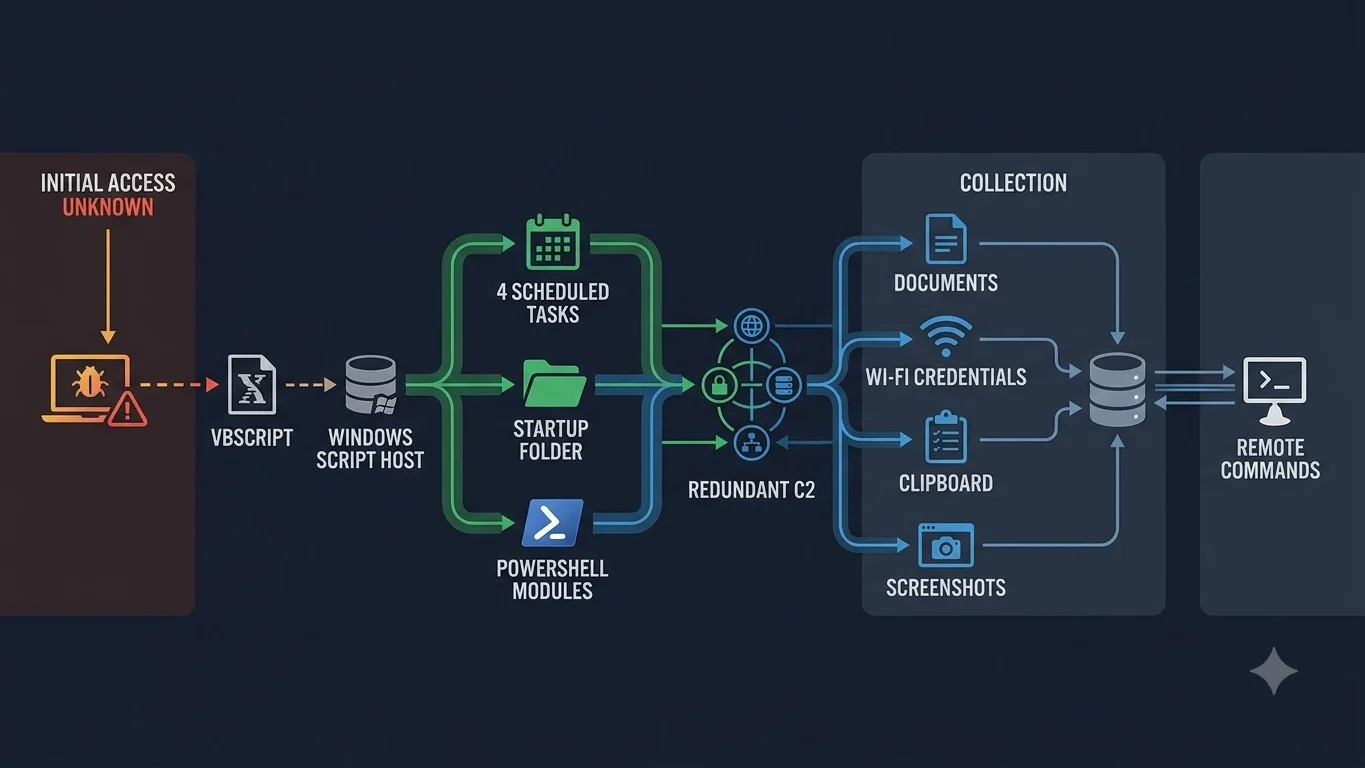
The recovered chain begins with wscript.exe executing an encoded VBScript file staged on the victim’s desktop. Reporting identifies the observed script as 95c9050t66.vbs.
The exact method used to place that script on the endpoint remains unknown. Securonix researchers told Help Net Security that phishing with a ZIP, ISO or IMG attachment would be consistent with comparable campaigns, but they could not confirm the initial delivery vector from the recovered system. TPS therefore does not present phishing as a confirmed TASK#STOMP initial-access method.
Why TASK#STOMP is difficult to remove partially
The malware establishes several independent persistence paths. Reporting says it creates four scheduled tasks using system-like names and also copies a script into the Startup folder so execution can resume when the user signs in.
The four reported scheduled-task names are Local Credential Manager, Network Audio Service, Windows Display Manager and Device Credential Handler. Its staged files are placed under a directory named WinDefendSvc, a name chosen to resemble legitimate Windows Defender-related activity.
This layered design matters during containment. Removing only the script visible on the desktop or deleting a single scheduled task may leave other persistence mechanisms intact.
Two PowerShell components maintain collection and remote access
Reporting based on the Securonix analysis describes two PowerShell-side components working together. One focuses on document collection and monitoring, while the other maintains a second communications path to the operators.
The components are designed to monitor one another and attempt to restart the partner component if it stops. Researchers also found similar implementation bugs in both modules, so the watchdog logic is not necessarily as reliable as the design suggests.
What TASK#STOMP steals
The malware prioritizes business-oriented documents and is reported to process Word files, PDFs, PowerPoint files, Excel files and then archives. Securonix researchers told Help Net Security that this ordering is more consistent with corporate-document collection than simple opportunistic credential theft, although one analyzed endpoint is not enough to prove a campaign-wide espionage objective.
TASK#STOMP also steals saved Wi-Fi credentials and clipboard data, captures screenshots and can monitor the filesystem for new or modified files. These capabilities can expose both business information and credentials that may be useful for subsequent access.
What is known about command and control
The reported malware communicates through two redundant command-and-control domains and uses a static authentication token. Securonix researchers described the hardcoded token as a potentially durable network indicator because it is not rotated per victim.
The current reporting identifies the C2 domains as corecloudfileshare[.]xyz and attachmentsharingdrive[.]xyz. Organizations should validate any indicator against current trusted threat-intelligence or Securonix guidance before blocking or acting on it, because infrastructure can change after disclosure.
What defenders should check now
Investigate wscript.exe or cscript.exe executing unexpected VBS files from Desktop, Downloads, temporary directories or other user-writable locations.
Check for the four reported system-like task names and investigate similarly suspicious tasks that execute hidden PowerShell or VBS content.
Look for unexpected script copies or startup entries that could restore execution after one scheduled task is removed.
Investigate unexpected malware files stored under a directory named to resemble Windows Defender activity.
Search network and proxy telemetry for the reported domains and, where visibility allows, the static authentication token described by Securonix.
Preserve evidence first, stop the malicious scripts, remove all confirmed scheduled tasks, Startup copies and staged files in one coordinated response, then reboot and verify that none of the scripts return.
What should not be inferred from the current evidence
The available research does not establish how many organizations are affected. Help Net Security says the analysis was built from one infected machine, so campaign scale remains unknown.
The malware also backdates several files to January 15, 2024. Securonix researchers explicitly warned that this timestamp is fabricated as an anti-forensic technique and should not be used as evidence that the campaign began in January 2024.
No named threat actor attribution was established. Securonix told Help Net Security that the sample, infrastructure and techniques did not overlap cleanly enough with a known advanced persistent threat toolkit to support attribution.
Is the IranTenders-themed browser activity proof of targeting?
Current reporting says the malware opens a Chrome workflow involving an IranTenders-themed domain associated with searchable procurement and contract information. Researchers said that could be consistent with organizations involved in tenders, contracts or Iran-related procurement, but one decoy or browser destination is not enough to establish sector or regional targeting.
TPS therefore does not treat the domain theme as proof that TASK#STOMP specifically targets Iran, procurement organizations or one geographic region.
What happens next
This page should be updated if Securonix publishes the originating research publicly, releases a fuller IOC set, confirms the initial delivery method, identifies additional victims, changes the known C2 infrastructure or attributes TASK#STOMP to a named actor.
The same canonical should also absorb material changes to persistence or containment guidance because those updates answer the same defender question: how to identify the infection, determine what may have been stolen and remove every foothold safely.