






If a GitHub token exposed incident has already been contained by revoking the token, the investigation is not finished. Revocation answers one question — whether that credential can authenticate again. It does not tell you what the token could access, whether it was actually used, or whether an attacker created another way back in before revocation.
The recovery workflow therefore needs three separate answers: potential access, observed use and current validity.
Direct answer
What should you do after a GitHub token is exposed?
Revoke or disable the credential first, preserve useful token metadata without unnecessarily retaining the secret value, determine its token type and permissions, define the exposure window and use GitHub’s available audit and repository evidence to identify token-linked activity. Then investigate any repositories, workflows, releases, packages, keys or permissions that may have been changed before creating a least-privilege replacement.
Critical distinction
Revoked does not mean investigated
A revoked token should no longer be usable for future authentication, but revocation does not prove that the credential was never used before it was disabled.
State 1
Token exposed
The secret appeared in code, logs, messages, malware output or another untrusted location.
State 2
Token revoked
Future authentication with that credential has been cut off.
State 3
Activity identified
Audit or repository evidence shows what the token actually did during the exposure window.
State 4
Scope remediated
Observed changes and persistence have been addressed and a safer replacement credential has been deployed if still needed.
In this guide
- Revoke first
- Preserve metadata, not the raw secret
- Identify the token type
- Define the exposure window
- Map what the token could access
- Repositories, scopes and permissions
- Search GitHub audit activity by token
- Potential access vs observed use
- Check repository changes
- Check workflows, releases and packages
- Check keys, apps and persistence
- Find where the token was exposed
- What audit logs may not prove
- Replace with least privilege
- Watch, investigate or escalate
- Fine-grained PAT example
- Classic PAT example
- Related TPS cybersecurity guides
- Verification boundaries
- Limitations
- FAQs
GitHub token exposed: revoke the credential before investigating deeper
Containment comes first. An exposed token can remain usable until it expires, is revoked, is otherwise invalidated or GitHub automatically revokes it under applicable secret-exposure handling.
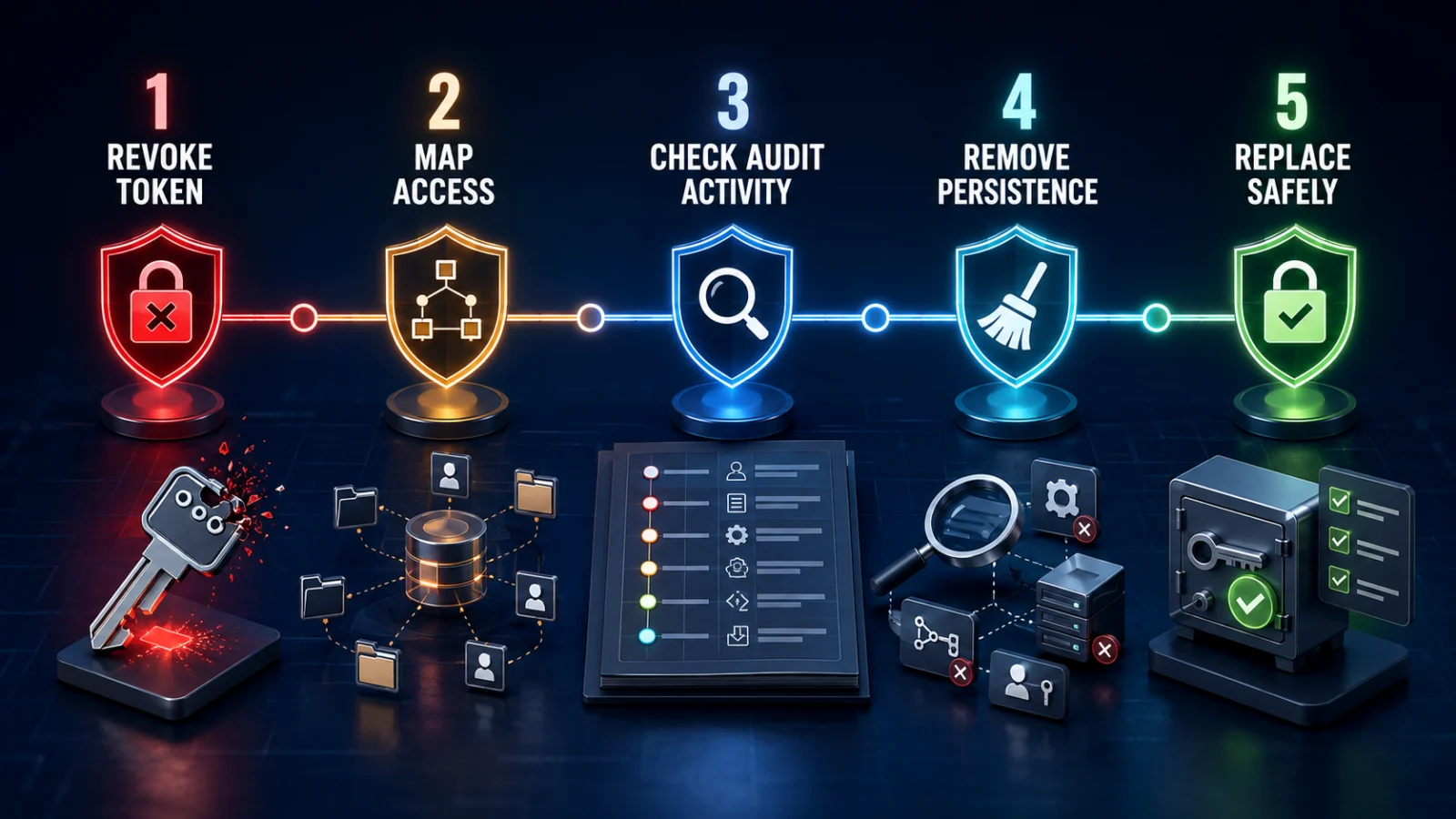
Containment and investigation path
Do not delay revocation simply to preserve the credential for testing. You usually need the token’s identity and metadata for investigation, not continued possession of an active stolen secret.
Preserve useful token metadata — not the raw token value
Before the incident record loses context, capture information that helps reconstruct potential access and the exposure window:
- token type;
- token name or identifier where available;
- owner or account;
- organization access;
- selected repositories;
- scopes or permissions;
- creation and expiration information where available;
- where the exposure occurred;
- earliest plausible exposure time;
- revocation time.
Preserve
Token identifiers, type, permissions, affected owner, exposure location, relevant timestamps and investigation notes.
Avoid retaining unnecessarily
The complete secret token value in tickets, screenshots, documents or chat systems.
Preserve token metadata ≠ preserve the secret. Investigation should not create a second credential-exposure problem.
Identify what kind of GitHub credential was exposed
GitHub supports several programmatic credential types, and the possible access and investigation path can differ.
| Credential type | What mainly defines potential access | Investigation consideration |
|---|---|---|
| Fine-grained personal access token | Resource owner, selected repositories and granular permissions | Potential access can often be bounded relatively tightly by repository selection and permission configuration. |
| Classic personal access token | Scopes plus account and organization authorization | Potential access may span a wider set of resources depending on scopes and organization policy. |
| OAuth token | Application authorization and granted scopes | Review both the credential and the associated application context. |
| GitHub App credential | App permissions and installation repository access | Review installation scope and app-related activity. |
| Deploy key | Repository to which the key is attached and read/write capability | Repository-specific investigation. |
| GitHub Actions token | Workflow/repository context and configured permissions | Do not treat it as equivalent to a long-lived user PAT. |
Define the exposure window before interpreting activity
The exposure window begins at the earliest plausible point when an unauthorized party could have obtained the credential and ends when the token became unusable.
Useful timestamps can include:
- when the secret first appeared in a public or untrusted location;
- when secret scanning detected it;
- when malware may have accessed it;
- when a repository containing the secret became public;
- when the token was revoked;
- when GitHub or another mechanism automatically invalidated it.
If the earliest exposure time is uncertain, widen the investigation window rather than inventing a precise compromise time.
Map what the token could access before asking what it actually accessed
Potential access is determined by the credential’s configuration and authorization.
Repositories
Which repositories were selected or otherwise reachable through the credential?
Permissions
Could the token read content, write code, manage workflows, administer repository settings or access other resource types?
Organization context
Was organization authorization, SSO or app installation required for additional resources?
This produces the maximum plausible blast radius. It does not establish that every permitted repository or operation was actually touched.
Repository selection and permissions define the investigation ceiling
For a fine-grained personal access token, capture the configured resource owner, repository access and granted permissions. For classic PATs and other credential types, document the relevant scopes and organization authorization.
TPS interpretation: investigate outward from what the credential was capable of doing. Do not begin by treating every repository in the account or organization as compromised when the token’s configuration proves a narrower boundary.
Use GitHub’s token-linked audit evidence where available
GitHub documents the ability to identify organization audit-log events performed by particular access tokens. Token-attributed records can help distinguish activity performed with the compromised credential from unrelated legitimate activity by the same user.
Depending on the event and environment, useful fields can include:
- token identifier;
- hashed token reference;
- token scopes;
- repository or repository ID;
- actor;
- user agent;
- request information;
- operation or event type;
- timestamp.
Prefer token-level attribution when available. Searching only by username can mix legitimate interactive activity with API activity performed using the exposed credential.
Separate potential access, observed access and observed modification
Potential
Token could access it
The repository or operation fell within the token’s configured authorization.
Observed access
Evidence shows activity
Audit or related evidence links the token to a recorded operation.
Observed modification
Something changed
Repository, workflow, permission, app or another resource was modified.
Remediated
Change investigated
Known malicious changes or persistence were removed and affected resources were validated.
| Evidence | What it tells you |
|---|---|
| Token permissions/scopes | What operations may have been allowed. |
| Repository selection | Which repositories may have been reachable. |
| Organization authorization | Whether additional organization resources could be accessed. |
| Token-linked audit event | An action GitHub recorded as being performed with the credential. |
| Repository history or configuration change | Evidence that a resource was actually modified. |
| Secret-scanning alert | Where or how GitHub detected the exposed credential. |
| Revocation event | When future use of that credential was cut off. |
Inspect repositories when token-linked activity points to them
If audit evidence or the token’s permission boundary identifies a repository of concern, inspect relevant repository state for the exposure window.
Depending on what the token could do, review:
- unexpected commits or pushes;
- new or changed branches and tags;
- repository visibility or settings changes;
- collaborator or team permission changes;
- deploy keys;
- webhooks;
- secrets or variables where administrative access was possible;
- release or package activity;
- workflow files and workflow executions.
Do not assume every category is relevant. Start with the actions the token’s permissions actually allowed.
Workflow, release and package access can widen the consequence
A token with write or administrative capability may affect more than repository source files.
Where supported by its permissions, investigate:
- GitHub Actions workflow changes;
- unexpected workflow runs;
- release creation or modification;
- package publication or deletion;
- repository or environment configuration;
- automation that could have exposed additional credentials.
If the original problem involved a malicious package or software-supply-chain credential exposure, use ThePulseSignal’s malicious npm package verification guide for the package-compromise side of the investigation.
Check whether the token was used to create another access path
Revoking the original token is insufficient if an attacker used it to create persistence before revocation.
Based on the credential’s permissions, investigate whether suspicious activity created or modified:
- deploy keys;
- repository collaborators;
- organization membership or permissions;
- GitHub Apps or OAuth authorizations;
- webhooks;
- workflow files that reference external infrastructure;
- new secrets or automation paths;
- other credentials exposed through repository or workflow access.
Containment rule: revoking the original token blocks that credential. It does not automatically remove another key, app, collaborator or automation path created while the token was valid.
Use secret-scanning evidence to understand the exposure source
GitHub secret-scanning alerts can help establish where a supported credential was exposed and whether the detected secret was active when found.
The exposure source matters because it changes the investigation scope:
Public repository
Assume unauthorized discovery was possible once the secret became public and investigate from the earliest plausible publication point.
Private repository
Exposure may be bounded by repository access, but the credential should still be treated based on who or what could read it.
Local compromise
If malware or an infostealer collected the token, the exposure may extend beyond GitHub to other credentials on the same endpoint.
For broad credential recovery after endpoint malware, see ThePulseSignal’s infostealer credential-rotation guide.
GitHub audit evidence may not prove every possible read
Audit logs are powerful but should not be interpreted as perfect packet-level history of every action an attacker could have taken.
The absence of one expected event does not automatically prove:
- the repository was never read;
- no API endpoint was called;
- no data was downloaded;
- no secret was viewed;
- no action occurred outside the available retention or logging scope.
Use audit logs as observed evidence, not as proof of universal non-access. Combine token permissions, repository state, exposure window and other available evidence.
Replace the credential with less privilege where possible
If the credential is still needed after containment and investigation, create a replacement only after understanding the original dependency.
Where practical:
- prefer fine-grained repository access over unnecessary broad access;
- select only required repositories;
- grant only required permissions;
- use an appropriate expiration;
- store the new credential in an approved secret-management location;
- update every legitimate dependency before retiring any transitional credential;
- avoid copying the replacement into source files, tickets or chat.
TPS interpretation: recreating the exact same broad credential restores functionality but misses the opportunity to reduce the future blast radius.
Watch, investigate or escalate
1
WATCH
The token was revoked promptly, its permission boundary is understood, available evidence shows no suspicious token-linked actions and no persistence indicators require deeper response.
2
INVESTIGATE
The token had meaningful repository or organization access, the exposure window is uncertain, or token-linked activity requires repository-level validation.
3
ESCALATE
The token had privileged organization access, workflow or secret access, package/release capability, administrative rights, or evidence shows attacker modification or persistence.
Worked example: exposed fine-grained personal access token
Assume a fine-grained PAT was accidentally committed to a public repository.
| Evidence | Conclusion or action |
|---|---|
| Token configured for three repositories | Those repositories define the primary potential repository boundary rather than every repository owned by the user. |
| Permissions include contents read/write | Both read and modification activity are relevant to the investigation. |
| Secret-scanning alert shows public exposure | Use the earliest plausible public exposure time when defining the incident window. |
| Token revoked | Future authentication is contained. |
| Audit events linked to one repository | That repository requires direct investigation. |
| Unexpected branch push found | Move from credential incident into repository-integrity investigation. |
| No suspicious activity in the other selected repositories | This reduces observed evidence of misuse but should not be overstated as proof that no read occurred. |
Worked example: classic PAT with broader scope
Assume a classic PAT with repository-related scope was exposed on a compromised developer endpoint.
The investigation should not assume the same narrow repository boundary as a fine-grained token.
Potential-access investigation
Review token scopes, account ownership, organization authorization and which repositories or organizations were reachable.
Observed-use investigation
Search token-linked audit evidence where available and validate any repositories, settings or automation touched during the exposure window.
If the developer endpoint also held other secrets, the GitHub token should be handled as one branch of the broader credential-exposure investigation rather than the only possible stolen credential.
Where this fits in the TPS cybersecurity cluster
Infostealer infection: which passwords, tokens and secrets must you rotate?
Use this when the starting problem is a compromised endpoint and you need to identify all credential classes that may require rotation.
CISA KEV: does exploited in the wild mean your system was compromised?
Use this when you need to distinguish public exploitation evidence from proof that your own environment was breached.
Security patch installed: is the vulnerability really fixed?
Use this when the problem is proving that remediation successfully removed a software vulnerability across the affected assets.
Verification notes: confirmed, conditional, interpretation and unknown
Confirmed
- Exposed GitHub tokens should be revoked or otherwise invalidated.
- GitHub supports token-linked audit investigation for supported token contexts.
- Token permissions and repository selection help define potential access.
- Revocation and historical-use investigation are separate incident-response steps.
Depends on token
- Which repositories were reachable.
- Which operations the credential could perform.
- Whether organization authorization widened access.
- Which audit fields or events are available.
TPS interpretation
- Potential access, observed access and observed modification should be recorded separately.
- Token-level attribution is preferable to username-only investigation where GitHub provides it.
- Replacement credentials should be narrowed where operationally possible.
Not established by revocation
- that the token was never used;
- that no repository data was read;
- that no persistence was created;
- that no other secret was exposed;
- that every permitted resource was compromised.
Verification method
ThePulseSignal reviewed GitHub documentation covering token-linked organization audit-log investigation, security incident investigation areas, personal access-token security events, token expiration and revocation, GitHub credential types and API credential-security guidance. TPS also reviewed GitHub’s credential-revocation API announcements showing support for revocation of exposed personal access tokens and later expansion to additional GitHub credential types.
The article intentionally separates credential containment, permission-scope mapping, audit attribution, repository investigation, persistence checks and least-privilege replacement.
Limitations and unresolved facts
No general guide can determine what one exposed GitHub token actually accessed without token-specific configuration and available audit evidence.
- GitHub token types have different permission and resource models.
- Audit-log availability, fields and retention can vary by account or organization context.
- The absence of a recorded event should not automatically be treated as proof that no read or access occurred.
- A token’s configured permissions show possible access, not confirmed attacker use.
- Revocation does not undo actions performed before revocation.
- Repository compromise can expose additional credentials or software-supply-chain paths beyond the original token.
- Replacing production credentials may require coordinated dependency updates.
- This article does not replace organization-specific incident-response, evidence-retention or legal procedures.
GitHub token exposed: frequently asked questions
What should I do first if a GitHub token is exposed?
Revoke or disable it promptly so the credential cannot continue authenticating, then investigate the period during which it may have been exposed.
Is revoking an exposed GitHub token enough?
No. Revocation is containment. It does not tell you whether the token was used before revocation or whether an attacker changed repositories, workflows, permissions, keys or integrations.
How do I check what a GitHub token accessed?
Start by mapping the token’s repositories, scopes and permissions, then use GitHub’s available token-linked audit evidence to identify recorded activity during the exposure window.
Can I tell which repository an exposed token used?
Where GitHub audit records include repository and token attribution, those events can help identify affected repositories. Repository state should then be inspected directly.
Does token permission mean the attacker used that permission?
No. Permission defines possible access. You need audit or repository evidence to establish observed activity or modification.
Should I keep a copy of the raw token for the investigation?
Usually the useful evidence is the token’s metadata, identity, permissions and exposure context. Avoid unnecessarily copying the active or revoked secret into incident documents.
What if the exposed token could modify GitHub Actions?
Inspect workflow files, unexpected workflow runs and any related secrets, releases or external automation that could have created a secondary compromise path.
Should the replacement token have the same permissions?
Not automatically. Use the incident as an opportunity to restrict repository selection, permissions and expiration to what the legitimate workload actually needs.
Bottom line
A GitHub token exposed incident is not finished when the token is revoked.
Best investigation chain: revoke token → preserve metadata → identify token type → define exposure window → map possible access → search token-linked activity → inspect affected repositories and persistence → replace with least privilege.
Revocation blocks the old credential. Investigation tells you whether anything happened before that block took effect.
Last verified: August 22, 2026. This guide reflects current GitHub documentation on credential revocation, token types, token-linked audit investigation, secret exposure and incident-response investigation.