MikroTik RouterOS active exploitation is now confirmed, and administrators should treat this as more than a routine firmware-update story. CERT Polska says attackers are actively exploiting a two-vulnerability RouterOS chain, dubbed MikroTrick, against devices whose SSH service is reachable from public networks. MikroTik has released fixed builds, but administrators whose routers were exposed before patching also need to check for signs of compromise.
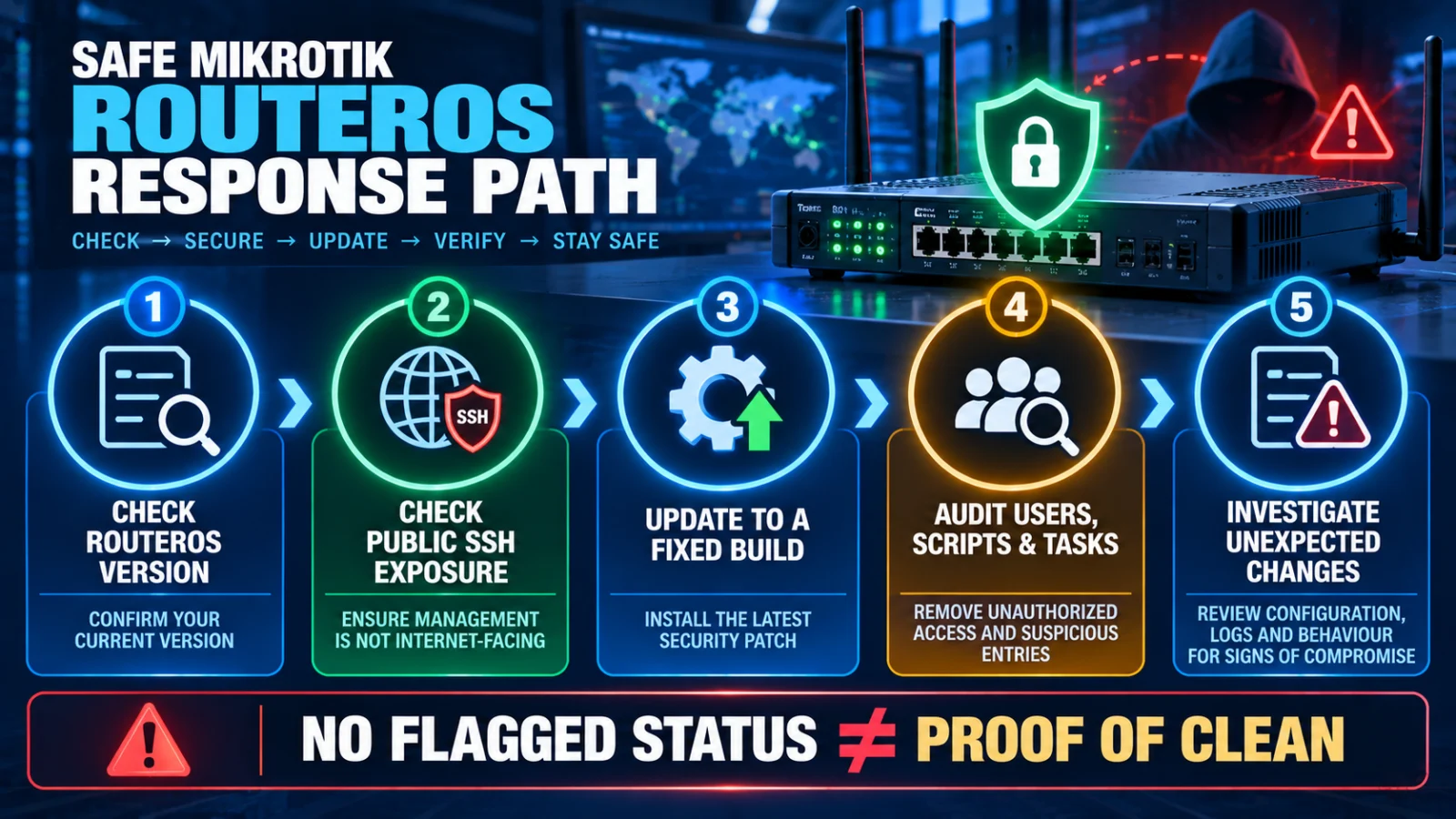
Direct answer: if your MikroTik RouterOS device was on an affected build and SSH was reachable from the internet, update to a fixed or newer RouterOS release immediately and then investigate the device for unauthorized changes. A clean or absent Flagged status alone does not prove that the router was never compromised.
What is being actively exploited?
CERT Polska disclosed six RouterOS vulnerabilities after MikroTik released an important security update on 3 September 2026. The most serious active-exploitation path combines CVE-2026-67276, an SSH authentication-bypass vulnerability, with CVE-2026-86060, which can manipulate privileges. CERT Polska says the two flaws can be chained to obtain unauthenticated administrative control when the relevant SSH exposure exists.
CERT Polska says successful attacks had been observed from at least 2 September. That changes the administrator’s task: updating is necessary, but an exposed device may also require compromise assessment because exploitation could have occurred before the patch was installed.
Which RouterOS versions contain the fixes?
The security fixes were released in the following RouterOS branches:
- 7.24.2 — stable
- 7.23.4 — long-term
- 6.49.21 — long-term
- 7.25beta3 — development/beta
Administrators should use an appropriate fixed or later supported release for their deployment rather than treating the version numbers above as a reason to downgrade a newer secure build.
Who needs to investigate most urgently?
The confirmed MikroTrick attack path is especially relevant where RouterOS SSH management was exposed to public networks. That does not mean every MikroTik router has the same immediate exposure. The important questions are which RouterOS build was running, whether SSH was externally reachable and whether the device was exposed before the security update was applied.
If the router is on an affected older build, move to an appropriate fixed or newer supported release.
Internet-accessible SSH materially increases relevance to the active exploitation described by CERT Polska.
Do not leave a known vulnerable release exposed while investigating.
Review users, scripts, scheduled tasks, proxy or tunnel configuration, logs and other unexpected changes.
A flagged device, an unknown privileged account or unexpected configuration should trigger incident-response and recovery procedures.
How should you check for compromise after patching?
CERT Polska recommends looking for unauthorized configuration changes after upgrading. The review should include unexpected users, scripts, scheduler entries, proxies, tunnels and other configuration that the administrator did not intentionally create.
CERT Polska also documented an unexpected privileged user named ops in observed attacks. That is an indicator worth checking for, but administrators should not assume that every compromise will look identical or leave that exact account behind.
What does MikroTik’s Flagged status mean?
MikroTik’s security mechanisms can mark a device as Flagged when suspicious configuration changes are detected. A flagged router deserves investigation and should not simply be returned to normal service without understanding what changed.
The reverse conclusion is unsafe: no Flagged status does not prove the router is clean. CERT Polska explicitly warns that the absence of this indicator cannot be treated as evidence that exploitation did not occur.
Is installing the update enough?
For a router that was never exposed through the relevant management path, patching may address the known vulnerability without evidence of prior compromise. For a device that was vulnerable and publicly exposed before the fix, however, patching closes the vulnerability but cannot retroactively prove that nobody gained access.
That distinction is the reason TPS recommends separating two tasks: patch the vulnerability and assess whether the exposed router was already compromised.
What should you do if you find suspicious changes?
Treat unexplained privileged users, scripts, scheduled tasks, proxies, tunnels or other unauthorized configuration as a potential compromise. Follow your organisation’s incident-response procedure, preserve relevant evidence where required, restore the device through a trusted recovery process and rotate credentials that may have been exposed after the environment is brought back under control.
Do not rely on deleting one suspicious user or script as proof that the incident is resolved. The safe objective is to regain confidence in the entire administrative state of the router.
What should administrators watch next?
- Any MikroTik update that expands or changes the affected-version guidance.
- New CERT Polska or other national-CERT information about exploitation scope.
- New compromise indicators or recovery guidance.
- Evidence that exploitation expands beyond the currently documented exposure conditions.
- Additional fixed RouterOS releases or vendor hardening guidance.
Verification note
TPS reviewed CERT Polska’s active-exploitation disclosure, its detailed RouterOS vulnerability advisory and MikroTik’s September 2026 security guidance. The article separates confirmed exploit conditions and fixed releases from broader compromise assumptions that the reviewed evidence does not support.
Limitations and unresolved facts
The reviewed evidence does not establish the total number of compromised routers, an India-specific victim count, the identity or motive of the attackers, or a complete universal set of compromise indicators. The absence of currently known indicators should therefore not be treated as proof that an exposed router was never compromised.