







PaperCut NG/MF administrators should now move to the official security maintenance release for their supported branch. PaperCut published 26.0.5, 25.0.13 and 24.1.10 on September 10, 2026. These fully QA-tested maintenance releases replace Emergency Patch Releases 1, 2 and 3 and contain the security fixes from the emergency patches plus additional hardening.
PaperCut still describes the underlying incident as active. Reports of new compromises have slowed considerably, but publicly reachable and unpatched servers continue to be targeted. Administrators should therefore separate two jobs: get every affected PaperCut NG/MF server onto the current secure maintenance release, and investigate whether the environment was compromised before mitigation.
Direct answer: use PaperCut NG/MF 26.0.5, 25.0.13 or 24.1.10 for the supported branch you operate. If you are on Emergency Patch Release 1 or 2, upgrade now. If you are already on Release 3, PaperCut says you are protected against the vulnerabilities described in this advisory, but you should still move to the maintenance release through normal scheduling. Publicly reachable unpatched Application Servers should be restricted immediately, and prior compromise should be investigated separately.
What is the current PaperCut security update?
The official maintenance releases are now the current PaperCut remediation target.
PaperCut published these regular maintenance releases on September 10:
- PaperCut NG/MF 26.0.5 for the v26 branch;
- PaperCut NG/MF 25.0.13 for the v25 branch; and
- PaperCut NG/MF 24.1.10 for the v24 branch.
PaperCut says these releases have completed its normal QA process, include all security fixes delivered through Emergency Patch Releases 1, 2 and 3, add further security hardening and carry normal release notes and version numbers.
Do the maintenance releases replace Emergency Patch Release 3?
Yes. PaperCut explicitly says the September 10 security maintenance releases replace all of the emergency patches.
If an environment is still running an emergency-patch build, the administrator should move to the maintenance release for that supported branch.
The urgency depends on the current state:
- Emergency Patch Release 1 or Release 2: upgrade now.
- Emergency Patch Release 3: PaperCut says Release 3 protects against the vulnerabilities described in the advisory, so the move to the maintenance release can be scheduled through the normal upgrade process rather than treated as the same emergency as an unpatched server.
- Unpatched supported installation: upgrade now to the appropriate maintenance release.
Is PaperCut still being actively exploited?
Yes, but the current vendor status indicates that the incident is easing rather than ending.
PaperCut says reports of new compromises have slowed considerably during the past week and that most customers now have their Application Server either behind a firewall or on a patched build.
However, servers that remain publicly reachable and unpatched continue to be targeted. PaperCut also continues to warn that post-compromise behaviour observed during the second attack wave has been more sophisticated than activity seen during the first days of the incident.
That means the existence of the normal maintenance release does not remove the need to investigate environments that were previously exposed while vulnerable.
Which vulnerabilities are involved?
The PaperCut NG/MF incident involves CVE-2026-81578 and CVE-2026-82078.
CVE-2026-81578
PaperCut describes this as a missing-authentication or access-control issue affecting administrative functionality. Under vulnerable conditions, unauthenticated remote requests can cause backend actions before access validation has completed and can modify certain system configurations.
CVE-2026-82078
This vulnerability involves unsafe dynamic class loading and can lead to execution of attacker-controlled Java bytecode when the required conditions are established.
The vulnerabilities matter operationally because configuration manipulation can be combined with the code-execution path in an attack chain.
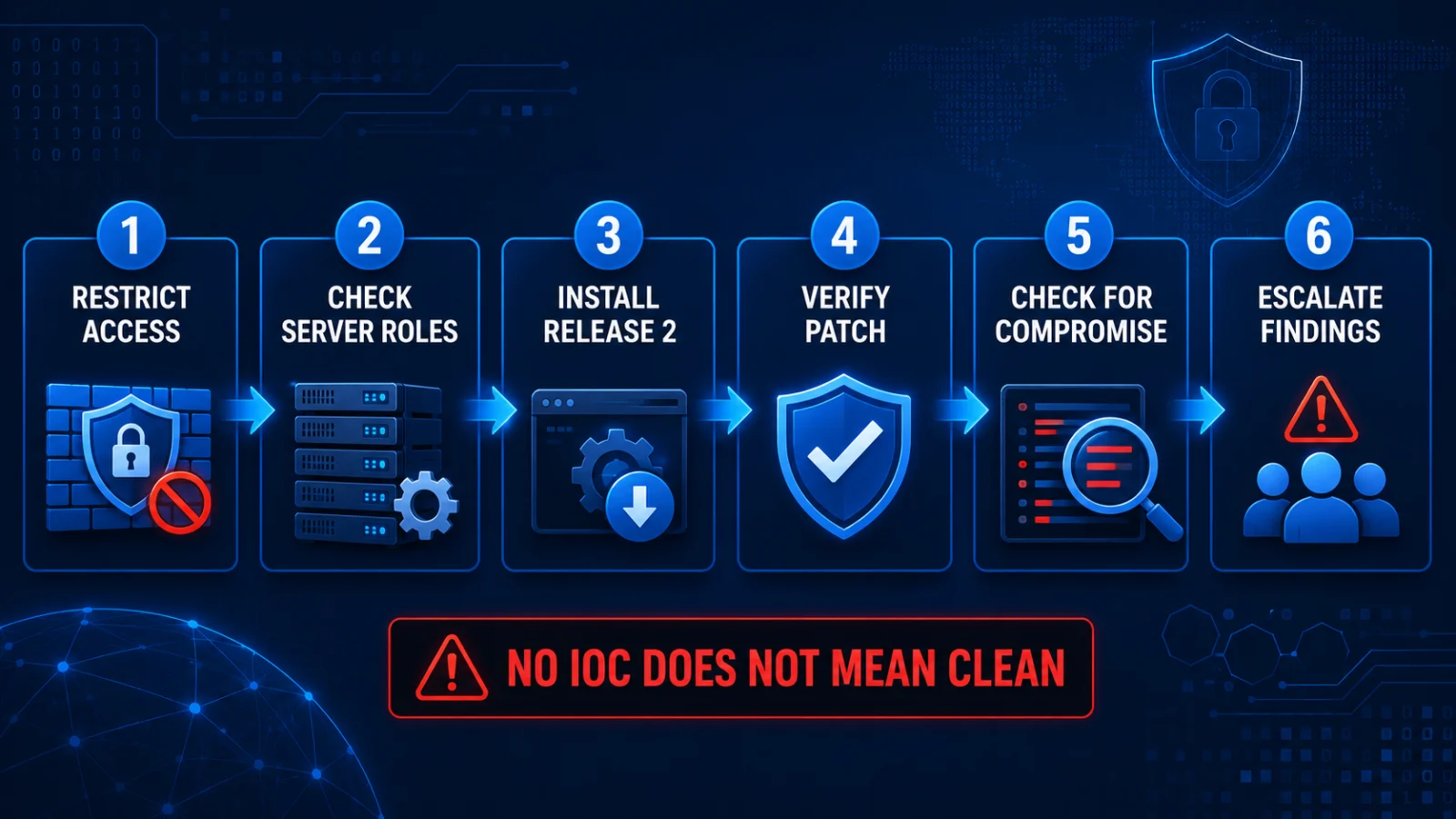
What should a PaperCut administrator do now?
1. Check internet exposure
If the PaperCut NG/MF Application Server remains publicly reachable and is not fully patched, restrict web access to trusted IP addresses immediately using firewall rules, network access controls or equivalent controls.
2. Identify the branch you operate
Determine whether the affected deployment is on supported v24, v25 or v26 so the correct maintenance release can be applied.
3. Install the current maintenance release
Move to 24.1.10, 25.0.13 or 26.0.5 as appropriate and use PaperCut’s standard upgrade procedure.
4. Update relevant server roles
PaperCut says Site Servers and secondary or print servers should also be updated to a patched version rather than updating only the primary Application Server.
5. Verify the deployed build
Confirm that every relevant PaperCut server is running the intended secure version and that no secondary role was missed.
6. Investigate earlier compromise
Review logs, files, processes and security telemetry against PaperCut’s current compromise-investigation guidance. A secure build today does not prove that the environment was clean while it was previously vulnerable.
7. Escalate suspicious findings
Preserve relevant evidence and follow the organisation’s incident-response process if suspicious PaperCut log activity, unexpected files, unusual child processes or unapproved remote-access tooling is identified.
What if Emergency Patch Release 3 is already installed?
PaperCut says organisations running Emergency Patch Release 3 are protected against the issues described in the advisory.
They should still move to the appropriate September 10 maintenance release because the maintenance build delivers the security fixes through PaperCut’s regular fully tested release process, adds further hardening and carries the normal release version and documentation.
PaperCut says this move can be scheduled normally for environments already on Release 3.
What if Release 1 or Release 2 is installed?
Upgrade now.
PaperCut’s current guidance distinguishes Release 1 and Release 2 from Release 3. Administrators still on the first or second emergency build should move to the current maintenance release rather than treating those older emergency patches as the final remediation state.
What happened to the SAML and Card/ID lookup regressions?
Emergency Patch Release 3 fixed the two regressions that had appeared during the emergency-patch phase:
- broken SAML login flows; and
- support for legacy Microsoft SQL Server drivers used for external Card/ID lookup.
The September 10 maintenance releases include the security fixes delivered through Release 3 as part of the normal release builds.
Administrators using external Card/ID lookup should still follow PaperCut’s current configuration documentation for that feature rather than relying on an old configuration fragment.
Do Site Servers and secondary servers also need updating?
Yes. PaperCut says Site Servers and secondary or print servers should be updated to a patched version, not only the primary Application Server.
PaperCut separately states that Mobility Print uses a different, unaffected architecture and is not impacted by the bulletin.
Does this affect PaperCut Hive or Pocket?
No, according to PaperCut’s advisory. The security bulletin applies to PaperCut NG and PaperCut MF.
How can administrators check for prior compromise?
PaperCut’s current guidance identifies several categories of evidence that administrators can inspect.
These include:
- alerts from endpoint, intrusion-detection or network-monitoring tools involving the PaperCut Application Server;
- missing, unexpectedly truncated or deleted
server.logfiles; - suspicious entries in
server.log; - unexpected files or commands associated with the PaperCut server process;
- unexpected child processes launched by
pc-apporpc-app.exe; and - unexpected remote-access tooling or services installed after compromise.
PaperCut’s September 10 guidance specifically highlights unexpected remote-access software and other post-compromise activity observed during investigated incidents.
Does finding no known indicator prove the server is clean?
No.
PaperCut explicitly warns that absence of the published indicators is not confirmation that an environment was unaffected.
Administrators should continue to distinguish:
- current mitigation: whether every relevant server now runs a secure maintenance release and is appropriately exposed; and
- historical compromise: whether an attacker gained access before mitigation was completed.
Why does public internet exposure still matter?
PaperCut says publicly reachable and unpatched servers continue to be targeted.
An exposed Application Server gives remote attackers access to the vulnerable web-management surface, so administrators who have not completed remediation should not rely on obscurity or the fact that compromise reports are slowing.
Restricting untrusted access remains an immediate mitigation for publicly exposed systems that are not yet securely upgraded.
Have attacks stopped because the maintenance release is available?
No. PaperCut says new compromise reports have slowed considerably, but it does not say attacks have stopped.
The vendor’s current status says publicly reachable unpatched servers continue to be targeted. Organisations should therefore treat the reduced compromise rate as evidence of improving defensive coverage, not as evidence that remaining vulnerable systems are safe.
Has the expected normal fixed release arrived?
Yes.
PaperCut published fully QA-tested regular maintenance releases on September 10. Versions 26.0.5, 25.0.13 and 24.1.10 now replace the emergency-patch workflow for supported v26, v25 and v24 installations.
The maintenance releases include the emergency security fixes, additional hardening, normal release notes and PaperCut’s standard release testing.
What should administrators monitor next?
- future PaperCut security-bulletin updates and revised indicators of compromise;
- new information about post-compromise behaviour from the second attack wave;
- whether previously exposed systems show suspicious historical activity;
- future maintenance releases or branch-specific security guidance;
- security tooling alerts involving PaperCut Application Servers; and
- whether any server role remains on an emergency patch or older vulnerable build.
Verification note
ThePulseSignal checked PaperCut’s current urgent security bulletin on September 11, 2026. PaperCut’s September 10 update confirms that regular maintenance releases 26.0.5, 25.0.13 and 24.1.10 are now available and replace all Emergency Patch Releases.
The same bulletin says compromise reports have slowed considerably, while publicly reachable and unpatched servers continue to be targeted. PaperCut still recommends compromise investigation because current patch status does not establish whether an environment was previously breached.
Limitations and unresolved facts
PaperCut has not established a complete public victim count or fully described every post-compromise action across affected environments. Third-party researchers have published additional indicators and campaign observations, but PaperCut states that some third-party indicators have not been independently verified by the vendor. Published indicators may evolve, and absence of currently known indicators does not prove that a previously exposed server was unaffected. Administrators should verify the current PaperCut bulletin and release notes before consequential upgrade, rollback or incident-response decisions.